 Start with onboarding




Security orchestration, automation and response (SOAR) is software that connects security tools and runs predefined playbooks, so steps such as enrichment, ticketing and containment happen without a person doing each one by hand. In the AI era, models read evidence and draft steps. Actions that change systems should stay behind explicit playbooks and human approvals.
Key takeaways
- Australia's ASD, CISA and partner agencies describe a SOAR platform as software that automates response by applying predefined playbooks, and say it will never replace human incident responders.
- The OASIS CACAO playbook specification notes that most shared playbooks need some modification before they work in another organization.
- OWASP's 2025 list of LLM risks recommends that a human approve high-impact actions and that authorization be enforced outside the model.
What is SOAR in cybersecurity?
SOAR in cybersecurity is a category of tools that orchestrate security systems through their APIs, automate repeatable steps and run response actions from playbooks. It is one way to do SOC automation, which is the use of software to run security operations center (SOC) tasks, such as gathering alerts, enriching them, opening cases and taking response actions, without a person doing each step by hand.
The joint practitioner guidance from ASD, CISA and partner agencies defines a SOAR as software that "automates the response to anomalous activity detected on a network" by applying predefined playbooks. MITRE's book 11 Strategies of a World-Class Cybersecurity Operations Center uses the term for "any product or tool principally used to achieve automation and orchestration for the SOC", and notes that SIEMs and case management systems reach many of the same outcomes.
What does a security orchestration, automation and response platform do?
A SOAR platform takes repeatable alert handling off the analyst. MITRE's list:
- Gather incidents from separate systems into one place for triage.
- Enrich and prioritize alerts with threat intelligence and what is known about the entities involved.
- Run information-gathering queries when an alert fires.
- Send users routine checks, such as asking "was this really you?"
- Take response actions "like terminating network connections or disabling user accounts".
MITRE calls SOAR "an indispensable capability for the modern SOC", and adds that "the SOC will generally get out what it puts into SOAR."
What is a SOAR playbook?
A SOAR playbook is a written procedure turned into steps a machine can run. The OASIS CACAO Security Playbooks 2.0 specification defines a playbook as "a workflow for security orchestration containing a set of steps (security actions) to be performed based on a logical process", started on demand, on a schedule or by an event.
MITRE lists what a playbook is likely to include:
- A title and its intent.
- Its scope: who it applies to.
- Stimulating conditions: when it should be used.
- The procedure, steps and expectations.
- Who approved it, and its revision history.
Our Polymarket post walks through a response playbook for a hijacked script.
Why do SOAR playbooks break?
SOAR playbooks break when they meet an environment they were not written for: another organization's, or your own after it changes. CACAO is blunt about shared playbooks: "most will not be immediately usable or supported in the recipient's organization due to environmental differences and will require some amount of modification to make them operational."
Detail cuts both ways. MITRE notes that a playbook written too high level leaves responders to fill gaps with their own knowledge, while "Too much and specific detail, and the playbook becomes obsolete quickly". ASD names the central challenge for SOAR as "tailoring an effective automated response to specific events", and warns that a misconfigured response can mistake regular behavior for an incident and take automated measures to isolate and respond.
Does AI replace SOAR playbooks?
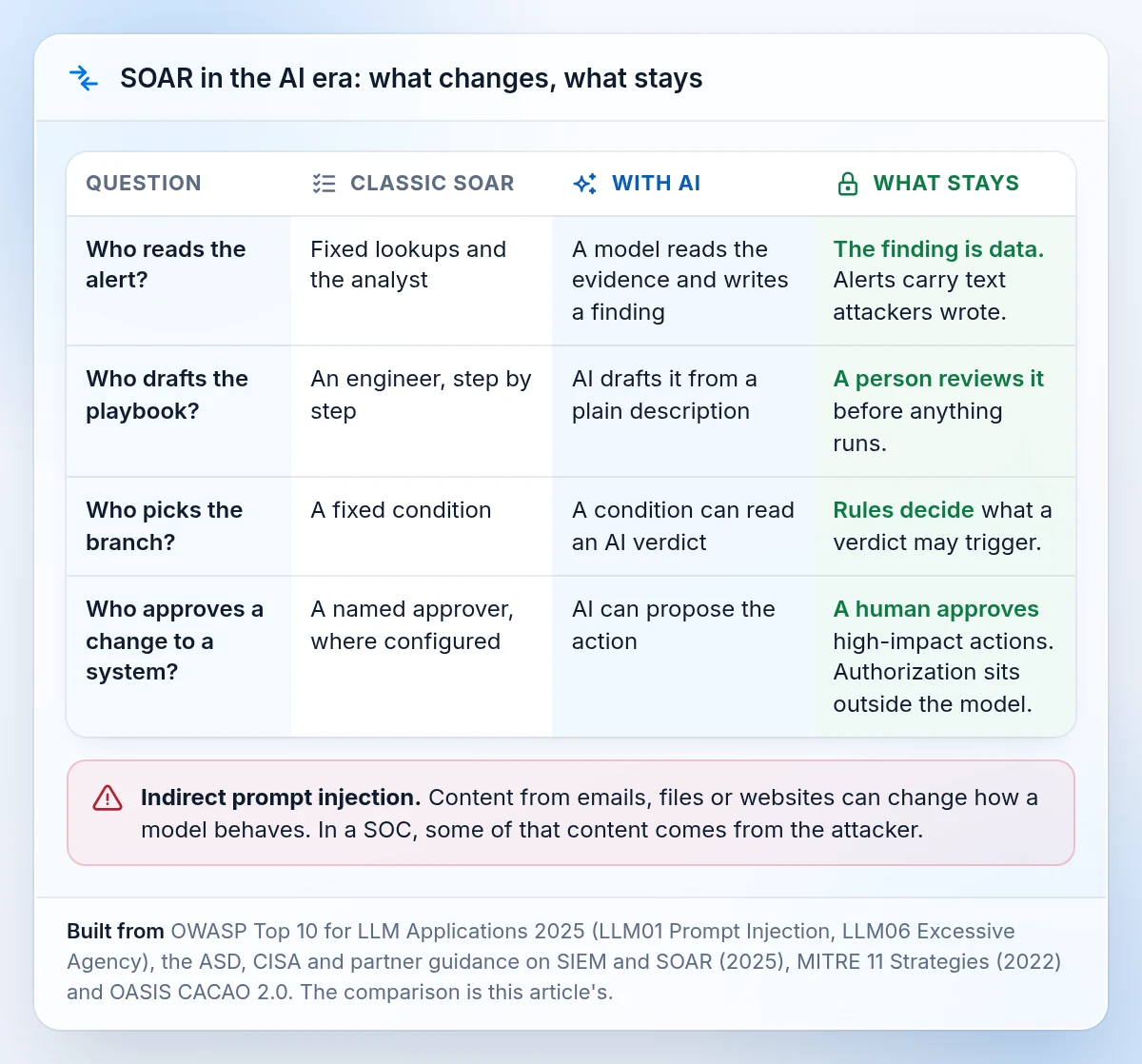
No. AI changes who reads the evidence and who drafts the steps, and actions still need explicit, tested playbooks. The claim that agents make playbooks obsolete runs into the security guidance for AI itself.
The OWASP Top 10 for LLM Applications 2025 lists excessive agency as a risk. One of its three causes is excessive autonomy: an application that "fails to independently verify and approve high-impact actions." Its mitigations include the advice to "require a human to approve high-impact actions before they are taken" and to "Implement authorization in downstream systems rather than relying on an LLM to decide if an action is allowed or not."
In a SOC the problem is sharper. OWASP's prompt injection entry (LLM01) describes indirect prompt injection, where a model takes input "from external sources, such as websites or files" and that content changes its behavior. Phishing emails, malware strings and log lines are external content, and attackers write some of them. A model that reads an alert should hand its findings to a playbook as data, and the playbook's own rules and approvals should decide what runs.
How do playbooks and AI work together in Imperum, step by step?
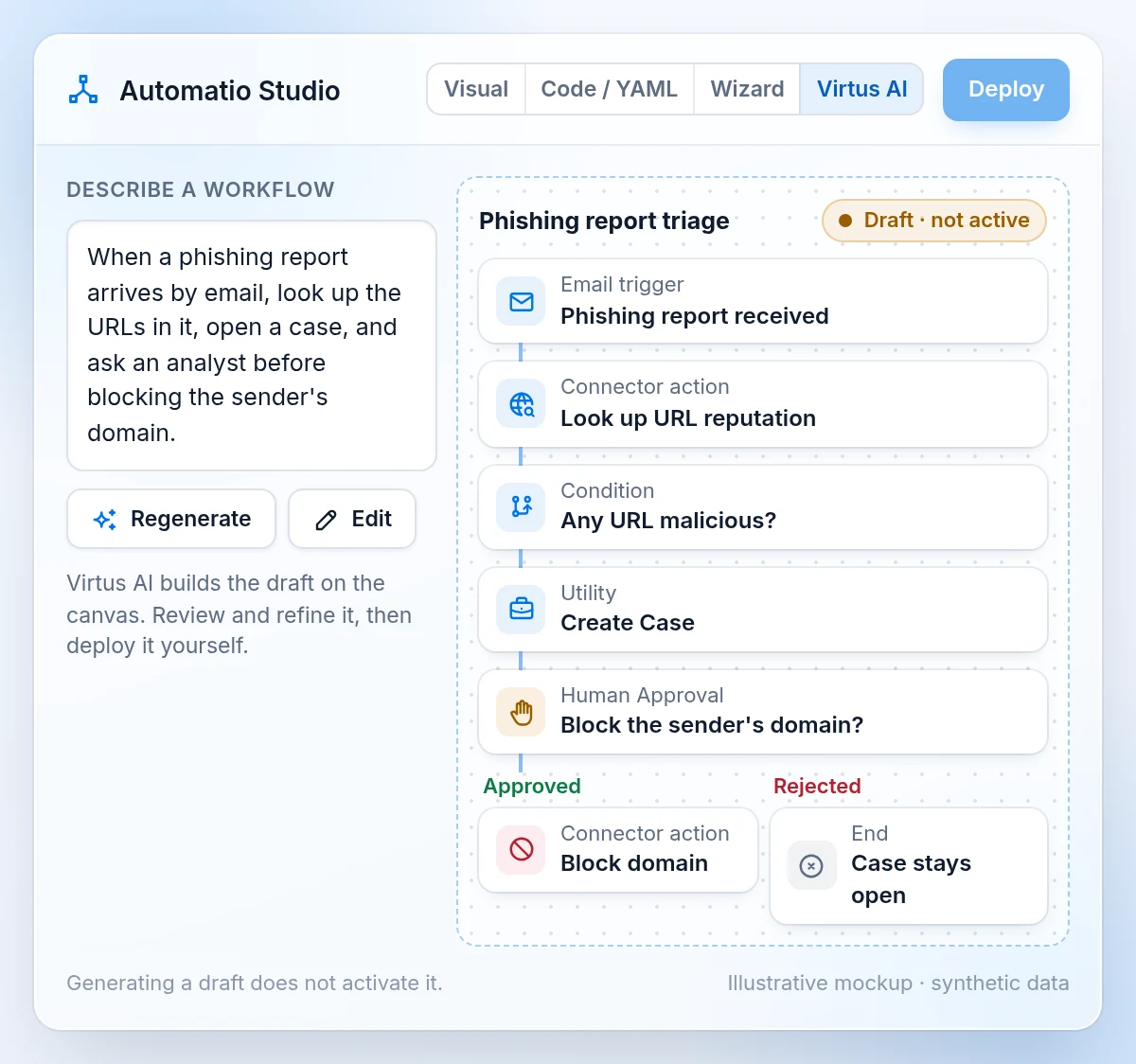
In Imperum, Automatio, Imperum's playbook engine, holds the explicit workflow, and AI works inside it at chosen points. Illustrative example with synthetic data.
Step 1: Let Virtus AI draft, and review the draft
In Automatio Studio you can build in Visual, Code / YAML or Wizard mode, or describe a workflow to Virtus AI and review its draft. Generating a draft does not activate it, so a person checks the branches, connectors and approvals before deploying.
Step 2: Call AI agents as steps, and keep the actions explicit
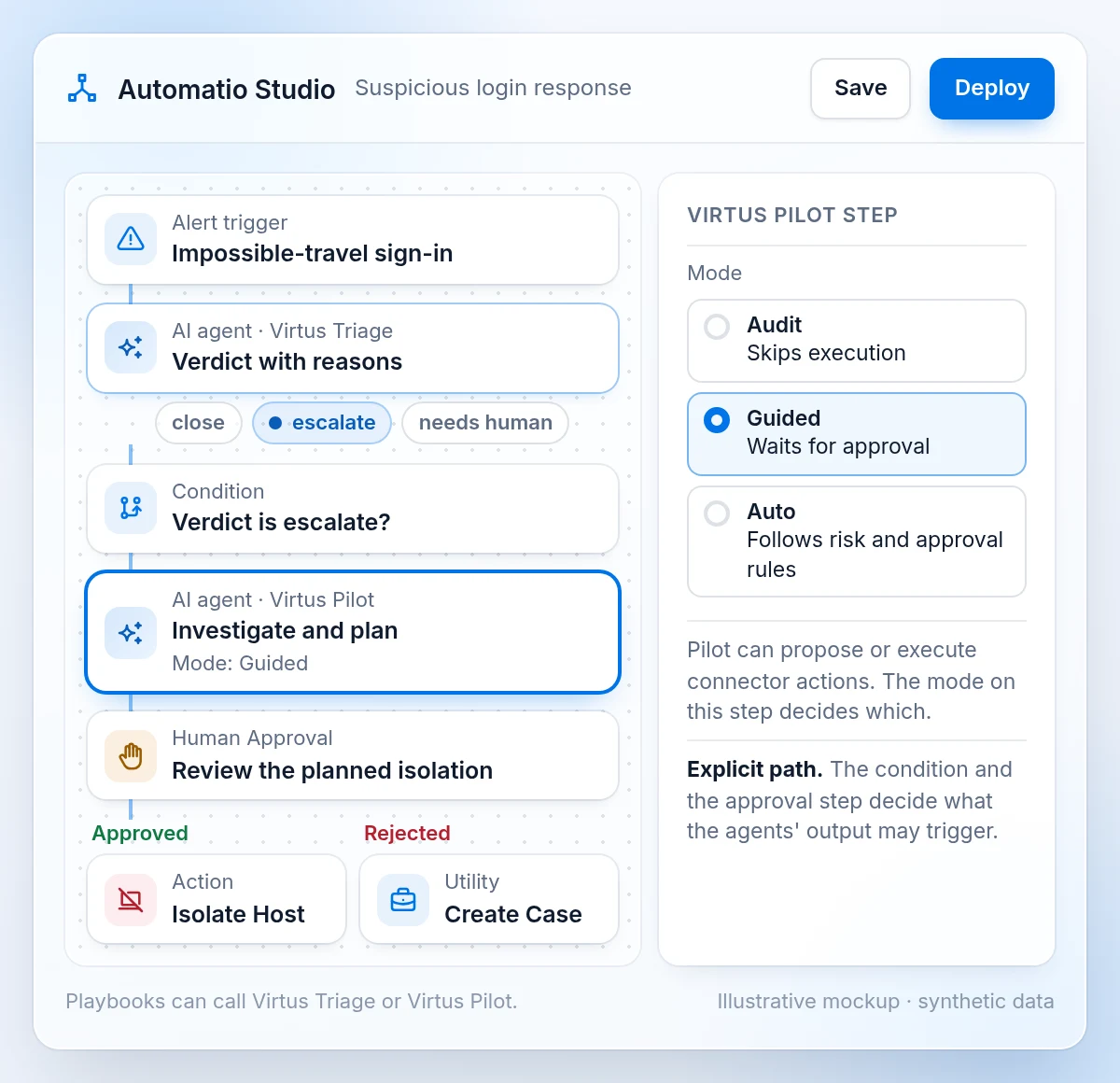
Automatio playbooks define the steps and branches of a workflow and can call Virtus Triage or Virtus Pilot as part of it. Virtus Triage returns a verdict of close, escalate or needs human, with its reasons. Virtus Pilot gathers evidence, analyzes an alert and builds an investigation plan, and it can propose or execute connector actions: Audit skips execution, Guided waits for approval, and Auto follows risk and approval rules. A condition can then read the result, and Human Approval steps can be placed before actions that require a decision.
Step 3: Stop a step when its connector definition changes
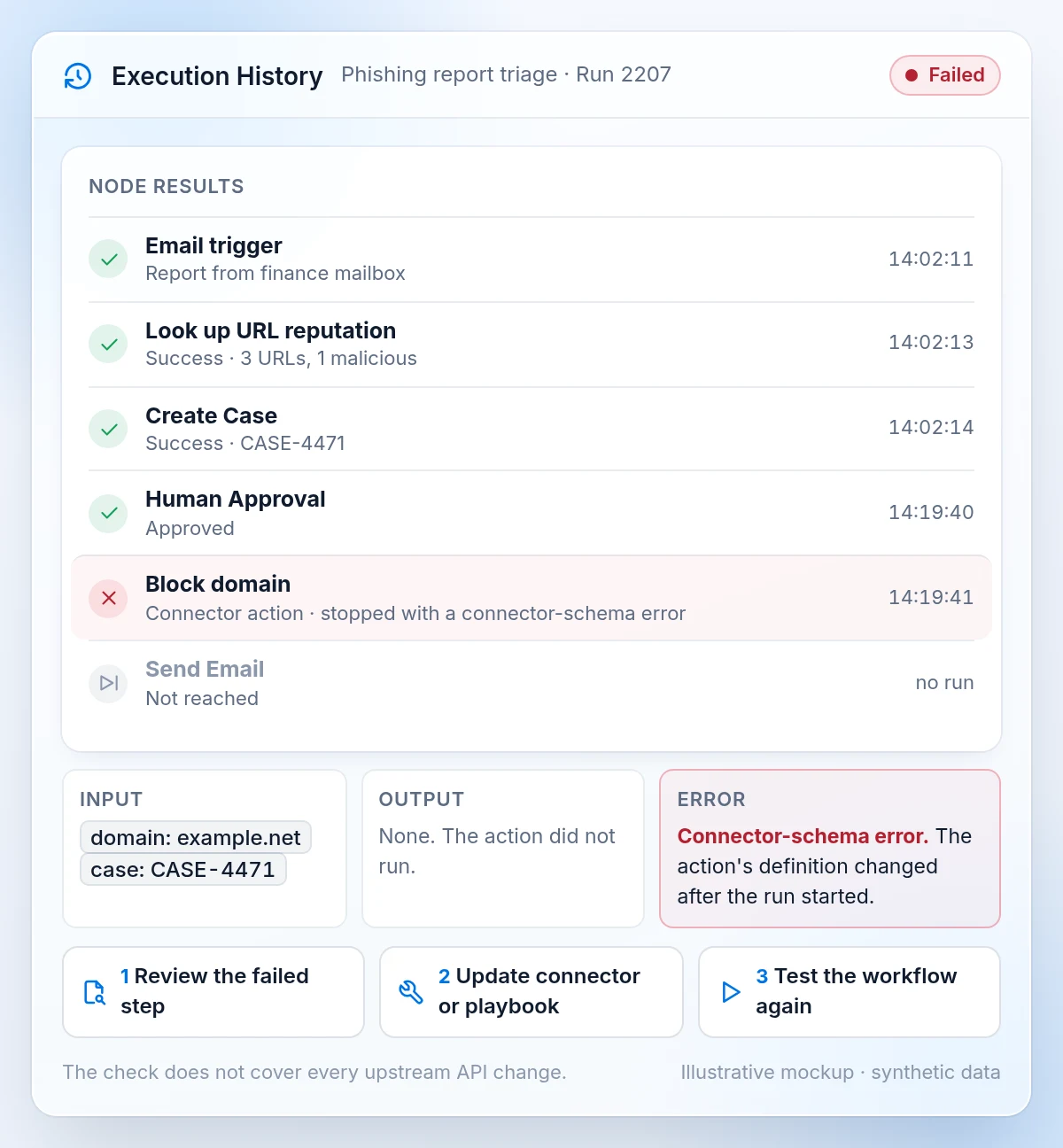
Automatio can compare a locally inspectable connector action's definition with the version captured when a run starts. If that definition changes during the run, the affected step can stop with a connector-schema error. The check does not cover every upstream API change: remote connectors and action definitions that cannot be captured are outside it. Review the failed step in Execution History, update the connector or playbook, and test again.
Where do the limits sit?
Automatio is part of the SecOps Platform and runs supported actions through configured connectors, and each action needs the right connector, credentials, parameters and permissions. Approval is a choice you place in the workflow, not a default before every action. Recovery after a platform restart depends on your deployment: an optional durable-execution path can resume a run from saved state when enabled, and not every interrupted run resumes. How far an AI verdict may act alone is yours to set, in conditions, approval steps and the agent step's mode.
What should you check first?
- List the playbooks that change systems, and check each has an approval step or a written reason why it does not.
- Find every place an AI model's output picks a branch or a target, and add a rule or approval between the output and the action.
- Note which connectors each playbook depends on and who is told when one changes.
Frequently asked questions
What is a SOAR platform?
A SOAR platform is software that connects security tools through their APIs and runs playbooks across them. It gathers alerts, enriches them, runs lookups and takes response actions such as disabling an account. Joint guidance from ASD, CISA and partner agencies says a SOAR platform automates part of the response and will never replace human incident responders.
What is a SOAR playbook?
A SOAR playbook is a sequence of security steps a platform can run, with conditions that pick the next step. The OASIS CACAO specification calls it a workflow for security orchestration. A playbook should state its intent, scope, trigger conditions, steps, approver and revision history, so the next analyst can follow and change it.
AI SOC vs SOAR: what is the difference?
SOAR runs the steps a person defined in a playbook. An AI SOC adds models that read alerts, gather evidence and propose or record verdicts. The two work together: AI reads and assesses, and actions that change systems should sit behind explicit steps and approvals. Our guide to what an AI SOC is covers the AI side.
How do you keep SOAR playbooks from breaking?
Treat each SOAR playbook as code that depends on its environment. Adapt shared playbooks to your own tools and data before use, since the CACAO specification says most will need it. Record which connectors each one calls, test it again after any connector or API change, and keep enough detail for a new analyst without making it brittle.
Next step
See how Automatio combines AI agent steps, conditions and Human Approval in one playbook you can review.