Incident response automation with human approval means an AI agent runs the investigation and the low-risk response steps on its own, while any action that changes a host or an account waits for an analyst to approve it. With Virtus Pilot, that boundary is not a promise in a slide deck. It is a setting: a risk line, an always-approve list and an execution mode, chosen per rule or playbook step.
- Automation takes over the repetitive first hour of a case: enrichment, retrieval, analysis and planning.
- Containment actions such as isolate, block, terminate, delete and quarantine go to the Approval Center by default, with the full plan attached.
- Every step, approval and rejection lands in the case record, so the next analyst sees what was found, what ran and what still needs attention.
We wrote this for SOC leads and analysts who want faster response without handing an agent the keys to production. Below we explain why the choice is not between full autonomy and manual work, how Virtus Pilot draws the line, and what it looks like on a real-shaped case.
Why "automate everything" and "approve everything" both fail
Most SOCs are stuck between two bad options. Manual response is safe but slow, and fully autonomous response is fast but hard to trust with a domain controller.
The manual first hour. Every escalated alert becomes a case, the case gets an owner, and the real work waits for whoever has time. That work is nearly always the same: pull host and user context, check what the account did elsewhere this week, read the timeline, decide on containment. It is repeated by hand on every case, and attackers do not wait for it.
The fixed playbook. Classic SOAR playbooks fix the speed problem for known situations, but they run the same steps whatever the evidence says. A playbook that isolates every host matching a rule will eventually isolate the wrong one, so teams either water playbooks down or never switch them on.
The unchecked agent. An AI agent that plans its own investigation is far more adaptive. But an agent that can also isolate hosts, disable accounts and delete files with no checkpoint asks a CISO to accept risk nobody can audit in advance.
The practical answer is a split by risk. Let the agent do the reading, thinking and low-impact actions immediately. Route anything that changes production to a person, with enough context to decide in seconds rather than rebuild the case from scratch. That is the model Virtus Pilot is built around.
How Virtus Pilot works: eight phases, one checkpoint
Virtus Pilot is Imperum's autonomous investigation agent. It picks up a case, usually the moment Virtus Triage escalates it, and runs the same eight phases every time: four read, two think, one acts within your limits and one writes the record.
- Intake: read the case and extract the hosts, users, IP addresses and files.
- Enrich: pull context from your connectors with read-only lookups.
- Retrieve: find similar past incidents and threat intelligence, and walk the knowledge graph up to four hops from each entity.
- Analyze: return findings, a risk score and MITRE ATT&CK techniques.
- Plan: write a hypothesis, priority actions and fallbacks; actions your connectors cannot perform are listed, not attempted.
- Execute: each action either runs through your connectors or waits in the Approval Center.
- Evaluate: decide whether the evidence is enough, looping back to enrichment up to the iteration limit you set.
- Report: write the findings into the case and notify your team.
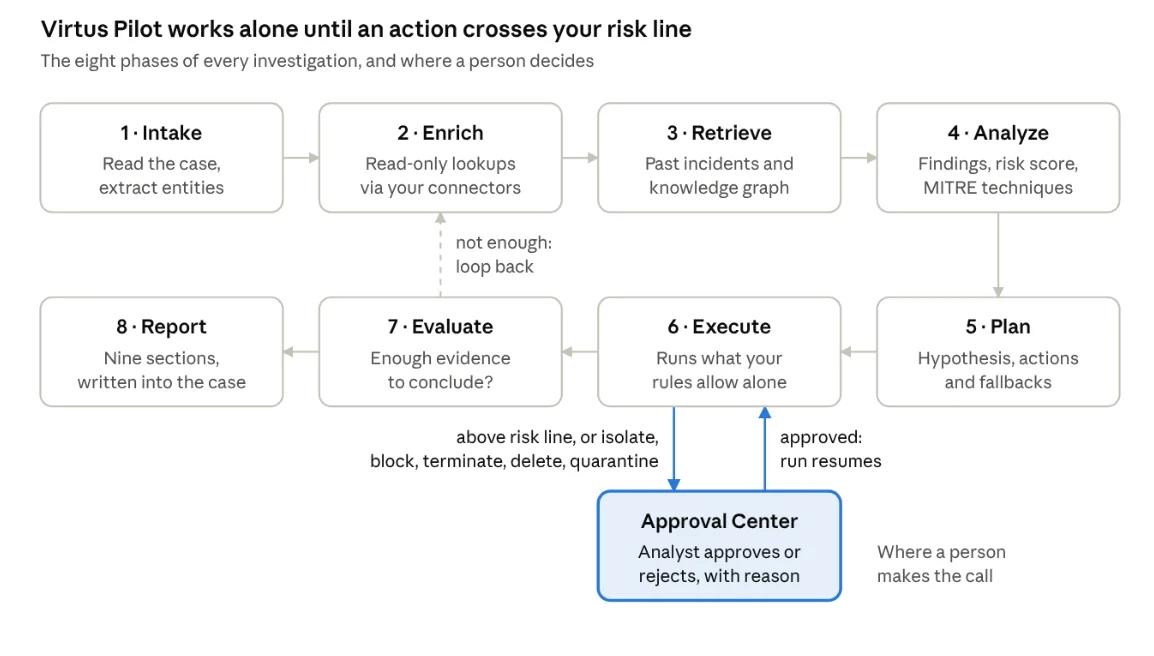
The first five phases never change anything in your environment. Execute is where automation meets approval: anything above your risk line, or any isolate, block, terminate, delete or quarantine action, goes to an analyst, and the run resumes once it is approved. Execute is where automation meets approval. Each action either runs through your connectors or waits in the Approval Center. Evaluate then decides whether the evidence is enough, looping back to enrichment up to the iteration limit you set. Report writes the findings into the case and notifies your team.
How human approval works in Virtus Pilot
Human approval in Virtus Pilot is controlled by three settings: an execution mode, a risk line and an always-approve list. Together they decide, action by action, what runs and what waits.
Three execution modes
The mode is set on the rule or playbook step that starts the investigation. That means a case from a lab subnet and a case from a domain controller can run under different modes.
- Audit Only: runs the full investigation on read-only data and skips the execute phase. Nothing waits for an analyst; the report shows what Pilot would have done. Best for evaluating Pilot's plans before trusting it with any action.
- Guided: runs reading, analysis and planning on its own. Every planned action waits for an analyst, whatever its risk level. Best for sensitive assets and the first weeks of rollout.
- Autonomous: runs every action at or below your risk line. Actions above the line and anything on the always-approve list wait for an analyst. Best for mature workflows where low-risk steps should start before anyone opens the case.
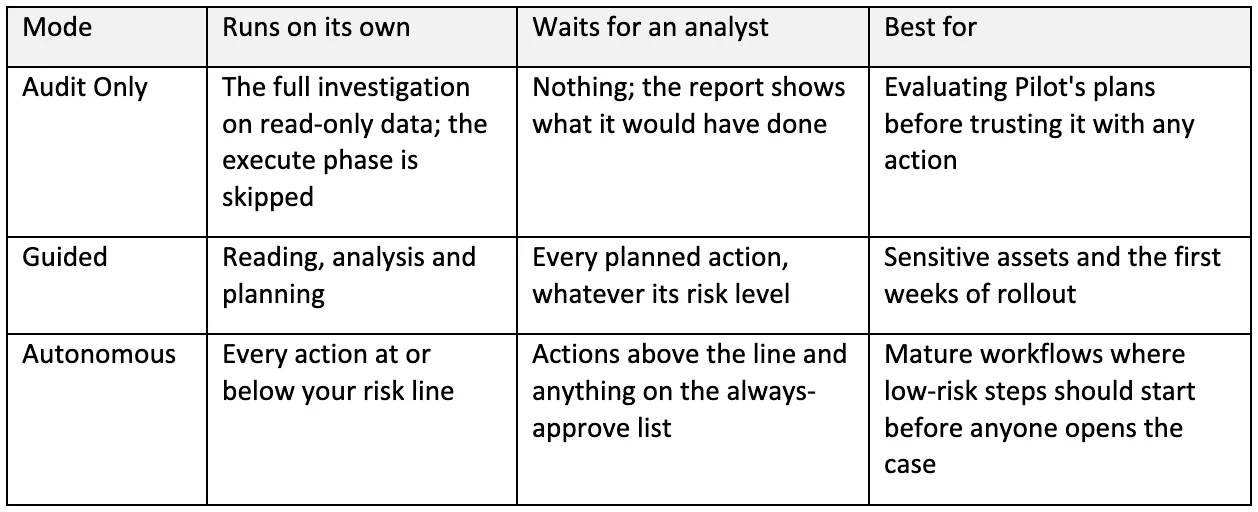
The built-in default is Autonomous with a low risk line. Tenant configuration can override it.
The risk line
One setting draws the line. At low, Pilot stays on queries and lookups. At medium, it adds enrichment actions. At high, it can reach containment.
The Approval Center
Gated actions land in the Approval Center under a dedicated Virtus Pilot tab. Each request carries the whole plan, not one line out of context: the hypothesis, the reasoning, the risk assessment and the other actions in the plan.
The analyst approves or rejects each action, and can record a reason. The investigation then resumes from where it paused. Analysts can also pause, resume or cancel a run at any phase.
Guardrails around the case
Pilot moves the case to Investigation and logs the start in the timeline. It takes ownership only if nobody owns the case, and it never closes a case. Before any model call, Veil masks IP addresses, hostnames, usernames, email addresses and other identifiers, then restores them in the response.
A worked example: persistence on a finance server
This synthetic case, adapted from the Virtus Pilot page, shows automation and approval sharing one investigation. Pilot ran in Autonomous mode with a low risk line, and containment always required approval.
The trigger. Virtus Triage escalates Case-2026-0142: the backup service account CORP\svc_backup has created a scheduled task on FIN-SRV-02.
The automated first hour. Pilot enriches the host, the account and two IP addresses through CrowdStrike, Active Directory and VirusTotal, using read-only lookups. It retrieves similar past incidents from the tenant's own history and the entity graph around FIN-SRV-02. Its analysis reports scheduled-task persistence, mapped to MITRE ATT&CK technique T1053.005, with a risk score of 74 out of 100.
The plan and the pause. Pilot proposes four actions. Isolating FIN-SRV-02 sits above this tenant's risk line, so that action stops in the Approval Center with the hypothesis and reasoning attached.
The human decision. The analyst approves the isolation. They reject disabling the service account and write down why: disabling a backup account could break production jobs, a business trade-off an agent should not make alone.
The finish. Pilot isolates the host through CrowdStrike and evaluates that it has enough evidence, so no second enrichment pass is needed. It writes the nine-section report into the case: executive summary, incident classification, MITRE mapping, scope of impact, timeline, evidence and findings, root cause, actions taken and recommendations. The case stays open for the analyst.
The result: the investigation and the plan were ready before anyone opened the case, a person made the one decision that carried business risk, and the record shows both the action and the rejected alternative with its reason.
What changes for analysts and SOC leads
With approval-gated automation, analysts stop doing the first hour by hand and start judging it. SOC leads stop arguing about whether to trust AI in general and start deciding which specific actions may run alone.
For analysts, response time moves from running queries to reviewing a plan. An approval request arrives with the hypothesis, evidence and alternatives already assembled, so the decision takes seconds instead of a fresh investigation. Rejections with reasons matter as much as approvals: they document the business context an agent cannot see.
For SOC leads, the risk line becomes a policy lever. Approval and rejection rates, analyst overrides and open-versus-closed cases show where Pilot's plans hold up and where they do not. That gives a concrete basis for widening, or narrowing, what runs without a person.
For compliance and audit, every run leaves the same trail: a timeline entry when the investigation starts, the nine-section report, and the status of each action, including who approved or rejected it.
How to roll it out
We recommend starting with one workflow your team already knows well:
- Choose the input. Pick one alert source and confirm the records and connectors Pilot can use.
- Define the handoff. Set triage routing and decide when Pilot or an analyst takes over.
- Review before expanding. Run Audit Only or Guided mode and assess Pilot's plans and proposed actions.
- Extend deliberately. Move proven workflows to Autonomous mode, and raise the risk line only where reviewed outcomes support it.
Questions teams ask about approval-gated response
Can Virtus Pilot isolate a host on its own? Only if you raise the risk line to high and remove isolate from the always-approve list. By default, isolate sits on that list with block, terminate, delete and quarantine.
Is Virtus Pilot a chatbot? No. Virtus Assistant is the conversational tool. Pilot runs an investigation from intake to report and hands you the decisions that need a person.
How does an investigation start? Usually when Virtus Triage escalates an alert. A case rule, a playbook step or the API can also start one.
Which model does it use, and where does it run? The model you assign in Virtus AI Engine, cloud-hosted or self-hosted. Pilot runs in cloud, on-premises and air-gapped deployments, with Veil redaction before every model call.
Automate the response, keep the judgment
Incident response does not have to choose between speed and control. Virtus Pilot automates the repeatable work of every case, then hands the decisions that carry risk to the people accountable for them, with the evidence already in hand.
Bring a case your team escalated last week to a 30-minute demo. We will run the eight phases on it and show you the plan, the actions Pilot would have asked you to approve, and the report it wrote. To go deeper, read the Virtus Pilot page or the Autonomous SOC overview.