
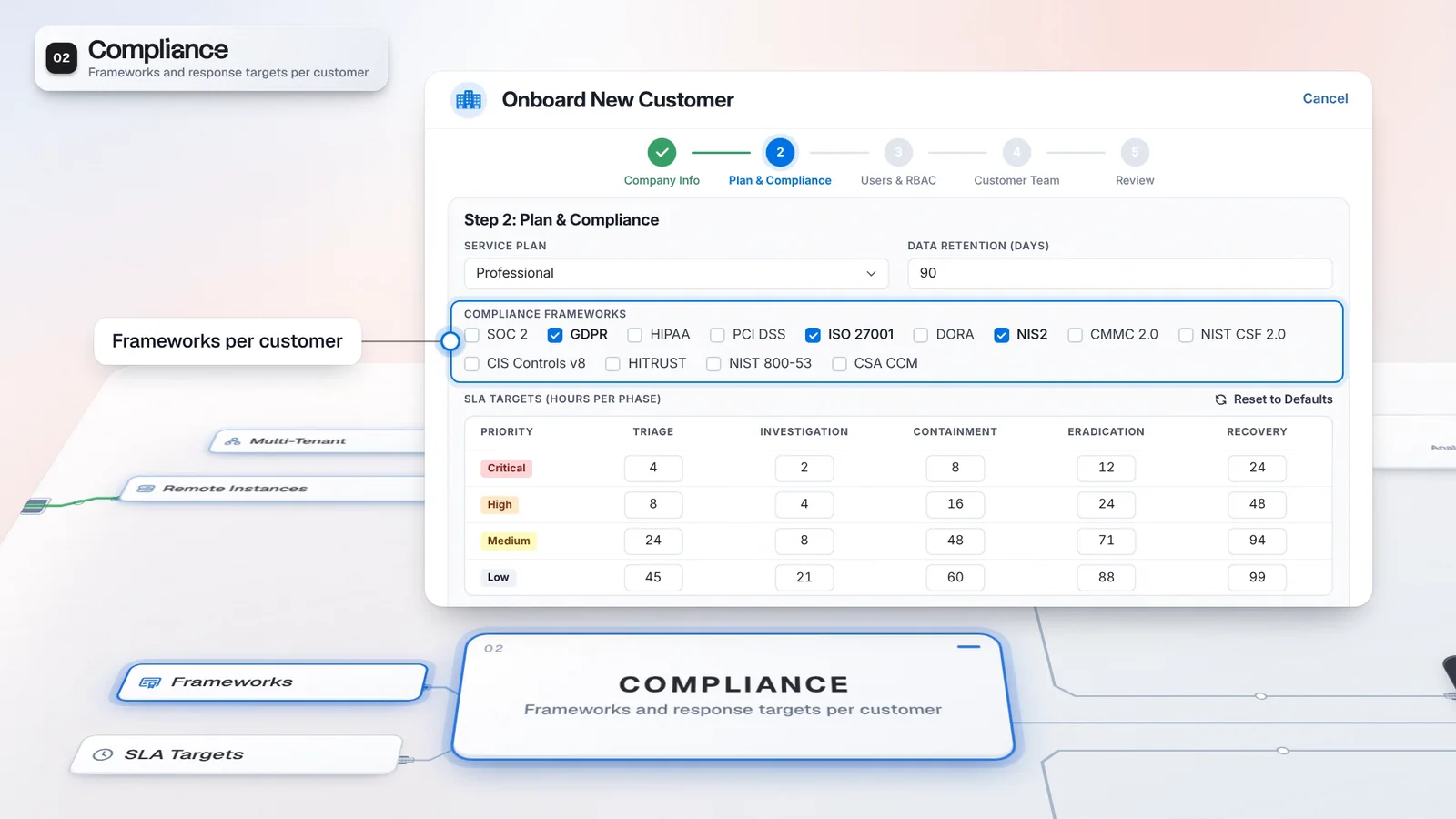
 Start with onboarding


Know who is involved
See the provider team and customer contacts against the tenant you selected.
Tenant Architecture puts your whole book of business in one hierarchy. Select a customer to see its provider team, customer contacts and connectors, and set response targets at the group level for its sub-tenants to inherit.
Select a tenant to inspect its team, connectors and service settings.
 A. Rivera

 3 analysts
 E. Vos
 2 contacts
Select a tenant to inspect its teams, connectors and service settings.
Select a tenant to inspect its team, connectors and service settings.
Select a tenant to inspect its team, connectors and service settings.
 Microsoft SentinelTenant-specific connection
 CrowdStrike FalconTenant-specific connection
This panel lists connections without showing their credentials.
Select a tenant to inspect its team, connectors and service settings.
These are workflow targets for tracking your service, not a promise of response times from Imperum.
Find Northstar in the provider’s customer hierarchy.
Review the provider analysts and customer contacts assigned to Northstar.
Inspect Northstar’s own and shared connectors without exposing credentials.
Select Harbor Retail to inspect its service targets inherited from Harbor Group.
A customer group can contain sub-tenants without losing the people responsible for each one. Tenant Architecture puts the hierarchy beside the selected tenant’s operational settings, ready for the next handover.
The Tree and Graph views organize customers and sub-tenants. Selecting a tenant brings its provider analysts, customer contacts and connectors into view. The MSSP Team identifies the lead, while the Customer Team keeps the customer’s contacts close to the work. The SLA Matrix shows whether a target is an override, inherited from an ancestor or taken from a global default. Assignments and target overrides take effect immediately for the tenant you selected.
A handover starts with the customer’s team and service settings already in view.
A. RiveraIllustrative customer and configuration. Not customer performance data.
See the provider team and customer contacts against the tenant you selected.
Sub-tenants can inherit targets, with overrides where the service requires them.
The hierarchy sets the working context for the detail panels. Review the customer’s team and connections before adjusting service targets, so changes reach the tenant you intend.
Add the customer to the provider’s tenant hierarchy.
Open Architecture under Multi-Tenant and explore the Tree or Graph view.
Select the tenant, assign the provider analysts and review its customer contacts.
Inspect its own and shared connectors without viewing their credentials.
Set targets by priority and phase, retaining inherited defaults where appropriate.
Rule-specific targets take precedence, followed by the tenant or nearest ancestor setting, then the global default. These are workflow targets for tracking your service, not a promise of response times from Imperum.
Tenant Architecture establishes the customer context. Casebook supplies the work carried out in that context, while connector profiles supply access to each customer’s tools.
Multi-Tenant is a default module of this edition.
Confirm a license that covers provider operations.
Multi-tenant operations are part of this tier.
A sub-tenant joins under its parent and inherits the group's targets, so onboarding a subsidiary does not mean rebuilding its settings. The next operator finds the customer's people and targets in one place instead of in separate notes.
The selected tenant brings its team, connectors and service settings together.
Inheritance carries parent or global targets down the customer hierarchy.
The Customer Team panel identifies the people attached to that tenant.
Place its sub-tenants under the intended parent.
Check the provider lead and the customer contacts on the selected tenant.
Check inherited cells before adding the overrides the service needs.
Yes. Customers and sub-tenants form a hierarchy that you can explore in Tenant Architecture. Service targets can inherit from a parent tenant or global settings, with tenant and rule-specific overrides where configured.
Authorized provider operators and administrators can access the customer scope assigned to them. Tenant context scopes supported views, API operations and connector credentials; placing a tenant in the hierarchy does not replace access permissions.
No. These are workflow targets for tracking your service, not a promise of response times from Imperum. Rule-specific targets take precedence; otherwise a tenant override, the nearest ancestor setting or the global default applies.
Have any other questions? Talk to our team
Review your customer hierarchy, teams and service targets with the Imperum team.