
 Start with onboarding


Dashboard charts with AI
Describe a chart a customer needs. Virtus proposes designs using that customer's data.
Dashboard › Create AI Widget
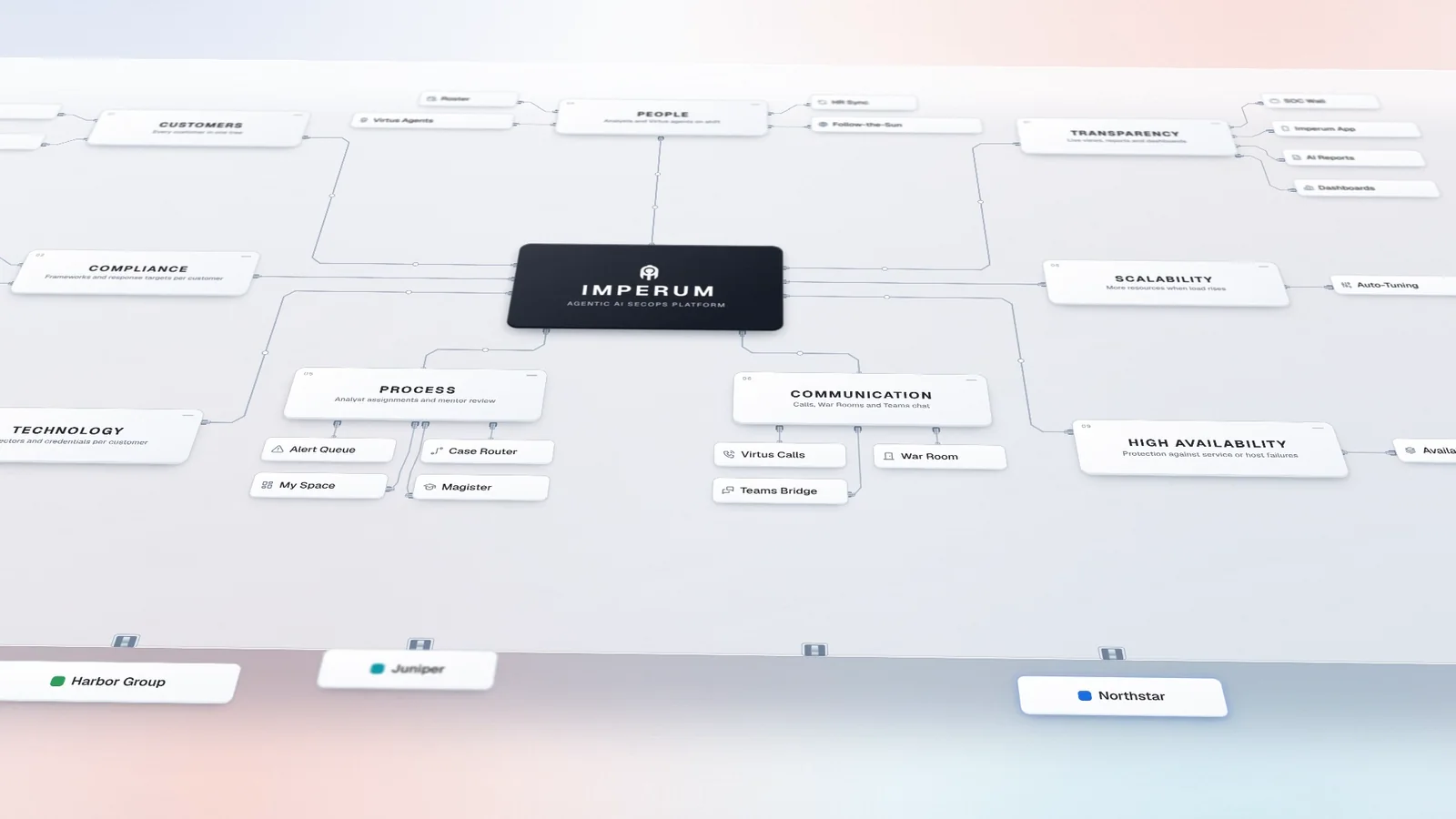
Add customers without adding consoles. Imperum gives MSSPs and MDR providers one multi-tenant platform for the process, technology, people and scale behind the service.
Start with the architecture, then onboard the customer, connect its tools, set up the team and run the service.
Decide where each customer runs: your shared platform, or a remote dedicated instance on a sensitive customer's site.
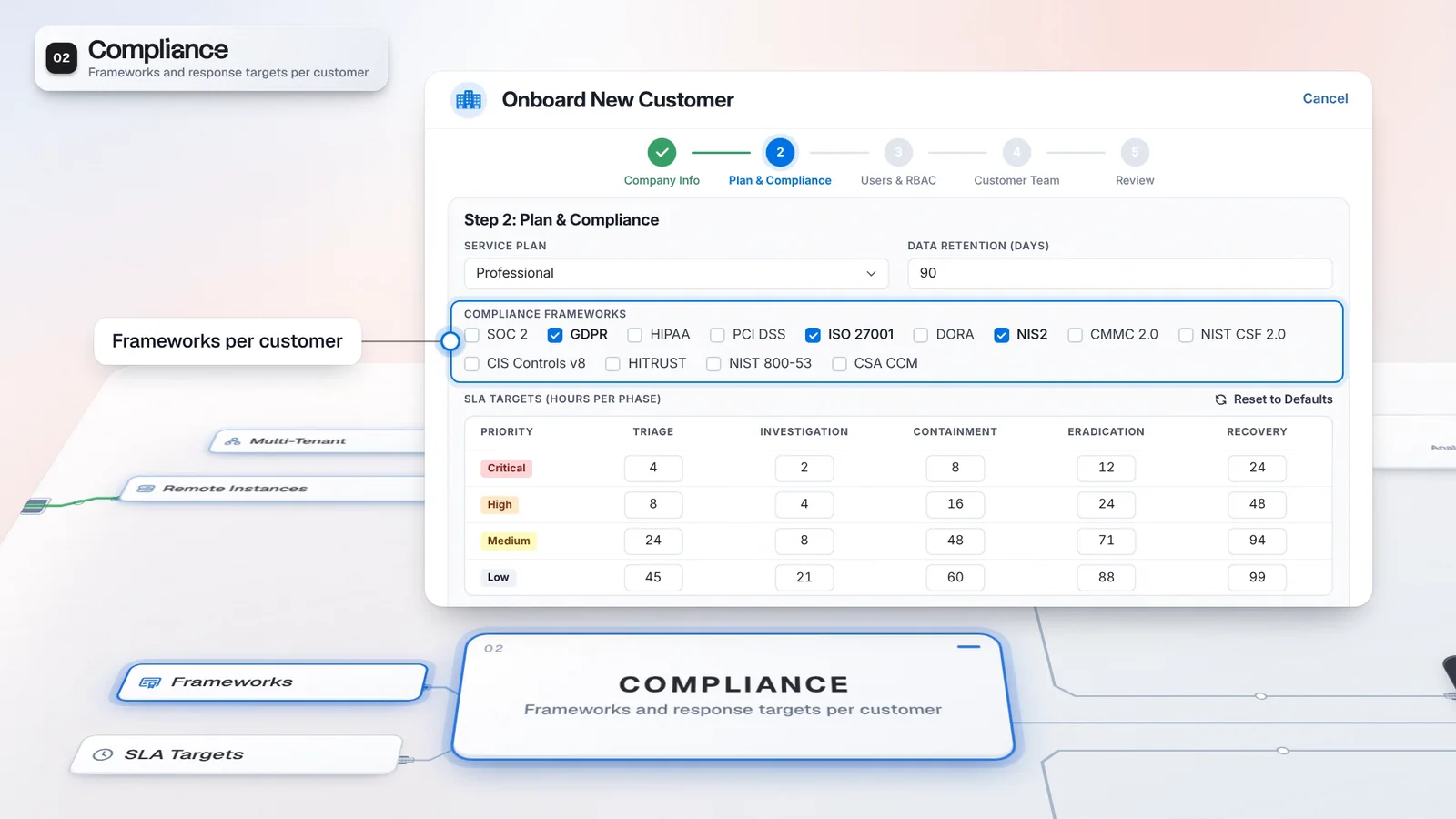
Tenant, frameworks and SLA targets, set in one onboarding form.
Connect tools with a profile per customer, a VPN route where needed and pooled API keys.
Assign dedicated or pooled analysts and add the customer contacts Virtus can call.
Alerts, cases, reports and dashboards for each customer.
Onboard a customer as its own tenant, then choose the frameworks, SLA targets, reports and dashboards its service needs.
Onboard each customer as a tenant and organize customers and sub-tenants in one hierarchy.
Choose frameworks such as ISO 27001 or NIS2 per customer at onboarding. Compliance dashboards and reports follow those choices.
Set hours per priority and phase for each customer. Inherit targets from the parent tenant or override them.
View tenant health, alerts and open cases across the customers you are authorized to access.
Describe the report a customer asks for. Virtus drafts the template from that customer's data.
Describe a chart a customer needs. Virtus proposes designs using that customer's data.
White-label the Self-Service Portal and, with an MSSP license for 25+ tenants, reports. Dashboards support a brand color.
Backlog, resolution, routing, workload and shift indicators per analyst, within each viewer's tenant scope.
Choose from 1,400+ connectors and 26,000+ connector actions. Deploy a connector once, then set credentials, VPN route and deployment location per customer.
Deploy a connector once. Each customer gets its own profile with credentials and endpoint.
Route tickets from one Sentinel, QRadar, ServiceNow, FortiSIEM or Sophos connector into each customer's tenant by a field value.
Reach customer tools behind a VPN. Assign a VPN profile to that customer's tenant profile.
Serve sensitive customers from a headless Imperum on their site, linked to your main platform. Deploy connectors locally or to that instance.
Pool VirusTotal keys. Imperum switches keys at the limit you set or when VirusTotal returns a rate-limit response.
On shared instances, tenant context scopes supported views, API operations and connector credentials. Full database isolation needs a dedicated instance.
Customize each customer's Self-Service Portal for requests, permitted cases, your service catalog and approvals, without access to the platform.
Scope roles to tenants. Track who did what, who is signed in, their location and time on the platform.
Let a customer's own admin manage users, roles and settings in their tenants. Your other customers stay out of view.
Use SAML or OIDC SSO per customer or across your tenant tree. LDAP or Active Directory connects one directory for the platform.
Use the Platform and Reporting APIs and Imperum's MCP server. The MCP Gateway also connects external MCP servers. Forward platform events to your SIEM.
See who is on shift and what they are working on, plan coverage across time zones, coach junior analysts and bring the customer's people in when a case escalates.
Dedicate analysts to a customer or serve it from your shared pool.
See who is on shift and what analysts are working on. Send direct messages, chat per case and mirror case chat to Microsoft Teams both ways.
Prioritizer scores each case. Router ranks analysts by skills, case history and workload, and can add a machine learning model trained on closed cases.
Pair junior analysts with mentors. In an active mentorship, a case the junior proposes to close goes to the mentor for review before it closes.
Plan shifts by team and time zone with analysts and Virtus agents together. Import Microsoft Teams Shifts.
Map teams and shifts across time zones. On cloud deployments, a world map shows where analysts are connected from now.
Hand open cases to the next shift with handoff notes. The case list shows who handed each case over.
Auto routing skips unavailable analysts, including those away or on leave. HR Sync imports approved leave from HR tools such as BambooHR.
Enroll remote analysts in the platform's built-in WireGuard VPN, with no separate VPN concentrator to buy. Each downloads their own configuration.
Name a customer's contacts per case stage. Virtus calls them by voice or emails them. On a call they can acknowledge, ask for a callback or hear a brief.
Share a War Room magic link so the customer works with your team on the case without access to the platform.
An attack on one customer can bring a surge of alerts. Choose the availability tier your deployment supports, and when Imperum controls its host, auto-tuning recommends or applies more resources as load rises.
Run a single node, a warm standby on a second host, or single-host HA that fails over by itself. Warm standby is not offered for MSSP deployments yet.
When Imperum controls its host, auto-tuning recommends more CPU and memory as load rises, or applies it. On Kubernetes it also adds storage and replicas.
Multi-tenant operations give providers customer-scoped views, connector profiles and onboarding workflows. Authorized operators can work across their permitted customer scope, while the self-service portal offers customer access to requests and cases. Configure tenant permissions and customer workflows to match the service you deliver, and confirm the required modules in your license.
The Portal is a product edition whose default modules include multi-tenant operations, Case Router and Case Prioritizer. The self-service customer portal is a separate feature for submitting requests and following permitted cases. Distinguish the edition you license from the customer-facing access and workflows you configure.
Multi-tenant mode uses tenant context to scope supported views, API operations and connector credentials. Customer profiles let you configure separate service connections. Authorized provider operators and administrators can access the customer scope assigned to them. Confirm the required data boundary, permissions and deployment arrangement for each customer during architecture review.
Yes. You can configure case time budgets by priority and lifecycle phase, with customer overrides and inheritance from a parent tenant. A rule-specific target takes precedence; otherwise the tenant setting or global default applies. These are workflow targets for tracking your service, not a promise of response times from Imperum.
AI agents belong to the Autonomous SOC and SecOps Platform product defaults; they are not part of The Portal’s default module set. If you want AI triage alongside provider operations, discuss a license that covers both capabilities, then configure the relevant integrations and triage rules. The enabled modules on your license determine access.
Yes. An authorized operator can deploy an enabled, validated playbook to selected tenants. Deployment creates a tenant-specific copy and records its relationship to the source.
A deployment can be removed from one tenant without removing the source playbook or another tenant’s copy. Check each tenant’s connector setup, permissions and approval configuration before putting the workflow into use.
Imperum can work alongside an existing SIEM or EDR through configured integrations. Those connections can supply alerts and make supported actions available to investigations and playbooks. Coverage depends on the connector, credentials and configuration, so validate the tools and workflows you want to retain.
Have any other questions? Talk to our team
Bring one customer's tools and alerts. See its tenant, the workflows licensed for your service and the customer's front door on your own use case.

 A. Rivera
 M. Kaya
 J. Dahl
 T. Bakker