
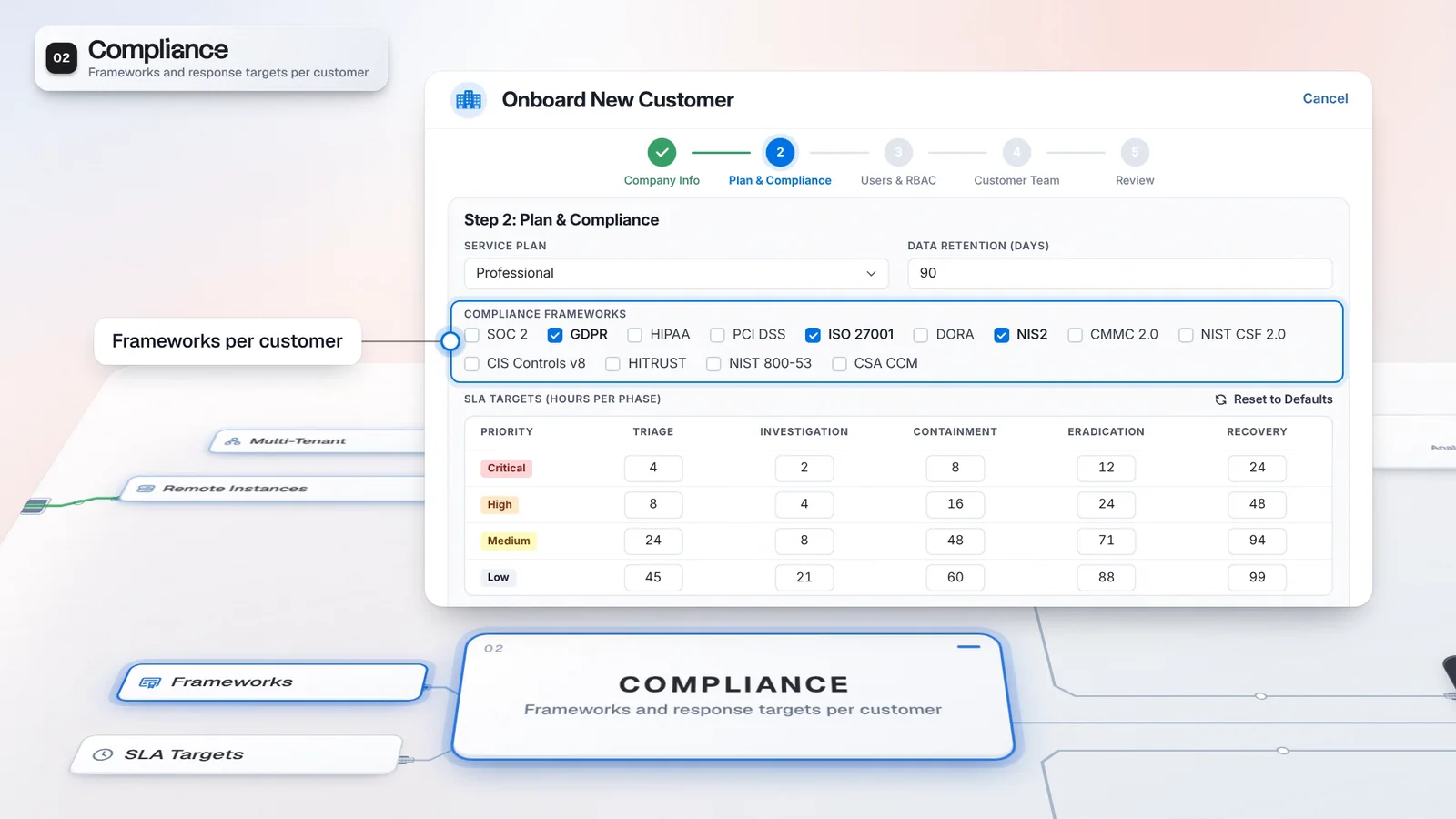
 Start with onboarding


A basis for urgency
The weighted score keeps available risk evidence behind the recommendation.
Virtus Case Prioritizer combines available evidence into a risk score and priority recommendation. Virtus Case Router ranks analysts using case context, skills and assignment history, with workload and availability in view; choose the routing mode per customer, starting from Off.
Synthetic signal scores with default base weights. Optional signals and narrative are excluded from this example.
Router requires its module entitlement.
Routing defaults to Off for each customer.
 A. RiveraIdentity skills / available capacity
 M. KayaDeclared skills / current workload
 J. DahlDeclared profile / assignment history
Deterministic ranking before a trained model is available. Analyst profiles are required.
Workload and availability matter alongside declared skills and observed outcomes.
A. RiveraRecommend mode leaves the assignment decision to a person.
A. RiveraNew case ownerThe illustrative risk score combines synthetic signals. Automated priority changes respect a severity floor and need evidence.
Northstar uses Recommend; Juniper remains Off. A customer’s mode determines whether assignment is suggested or attempted automatically.
The case context, analyst profiles and workload inform the shortlist. Deterministic ranking applies before a trained model is available.
A person confirms A. Rivera in Recommend mode. The case keeps the ownership decision with its investigation context.
Deciding what needs attention and deciding who can handle it are different tasks. Prioritizer explains the case’s risk, while Router gives your lead an analyst shortlist grounded in skills and workload.
The risk score combines available case signals, including severity, affected entities and business context. Automatic scoring for new cases is enabled by default, but the automated path respects a severity floor and does not change priority without evidence. Router ranks analysts against that case. In Recommend mode, your lead reviews the reasons and applies the assignment.
Explain both why a case needs attention and why an analyst is proposed to own it.
A. RiveraIllustrative setup and values, not customer results.
The weighted score keeps available risk evidence behind the recommendation.
Skills, assignment outcomes and capacity inform the ranked analysts.
Fill in analyst profiles before asking Router for recommendations. Choose the customer’s routing behavior separately from model training, then inspect the recommendation and confirm who takes the work.
Review the new case and its evidence-based priority recommendation.
Choose Off, Recommend or Auto for the customer; the default is Off.
In Recommend mode, review the ranked analysts and reasons before confirming ownership.
Continue the investigation with the chosen owner and applicable priority and phase targets.
Router requires its module entitlement. Auto attempts to assign an eligible, available analyst; failed assignments and unavailable candidates leave work for the team.
The priority helps determine the applicable response target, and the owner continues the investigation in Casebook. The Portal includes Prioritizer and Router by default for providers keeping their existing security stack.
Case Prioritizer and Case Router are defaults.
Router requires its module entitlement.
Includes the Autonomous SOC capabilities.
The priority shows which case needs attention, and the shortlist shows who can take it. Each customer gets the routing behavior it agreed to: Off, Recommend or Auto.
Declared skills and observed work inform the analyst shortlist.
Training a ranking model does not enable automatic assignment.
Choose Recommend for a customer that needs a person to confirm ownership.
Record the skills and experience the ranker needs.
Review the shortlist with the customer’s routing behavior in mind.
Confirm the case owner and applicable response target.
Automatic scoring for new cases is enabled by default. The automated priority path respects a severity floor and will not change priority without evidence. Routing is separate and defaults to Off. Recommend needs a person to apply the assignment; Automatic attempts eligible new cases subject to availability and routing constraints.
Yes. Set Off, Recommend or Auto per customer. Off provides no recommendations or automatic assignment. Router requires its module entitlement, and analyst profiles are needed for recommendations. Training a model does not turn on automatic assignment.
Have any other questions? Talk to our team
Review a customer case and your analyst routing controls with the Imperum team.