
 Start with onboarding


Reuse the group settings
Sub-tenants inherit a target unless a more specific setting applies.
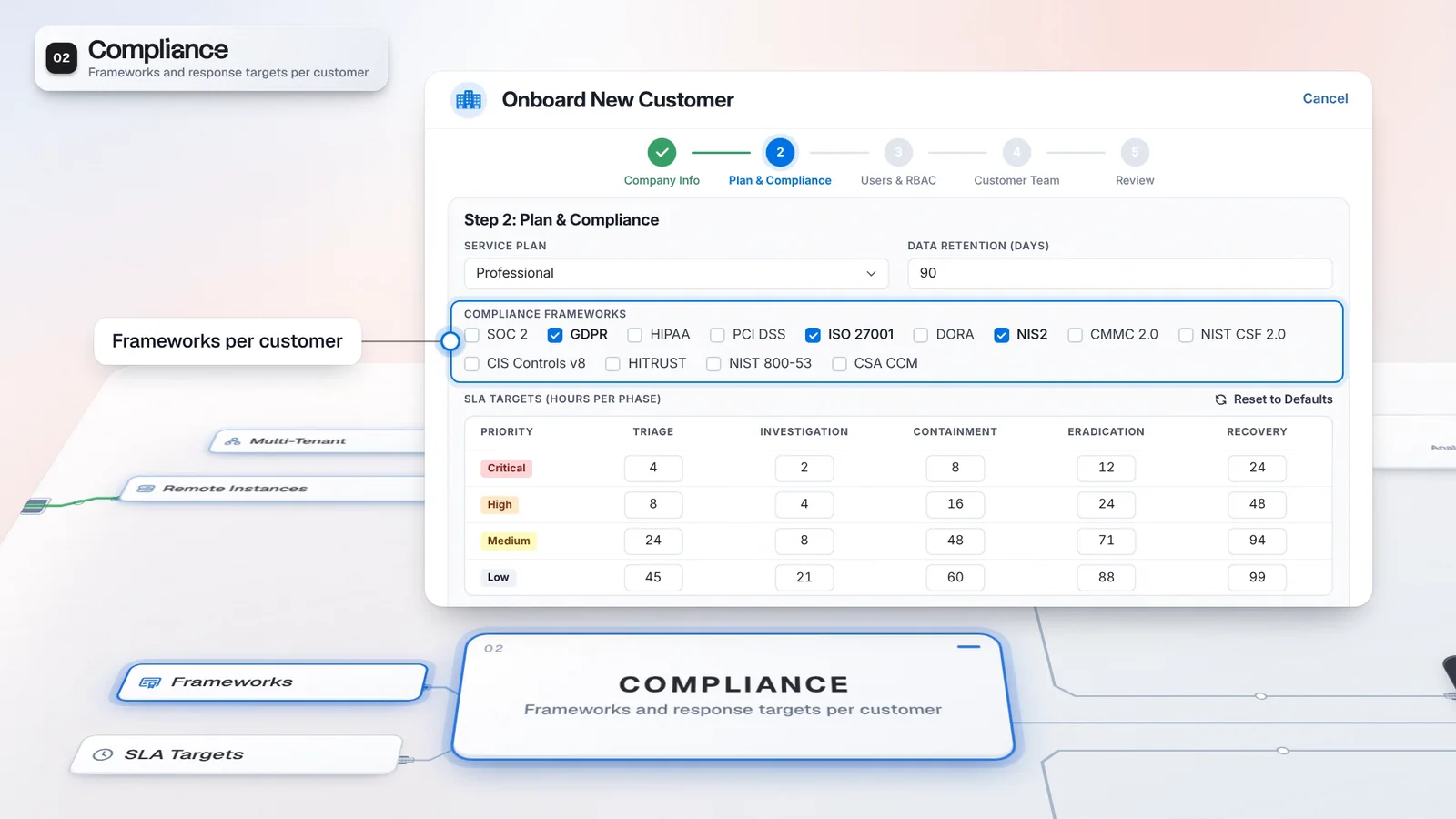
Set response targets by priority and investigation phase in each customer’s SLA Matrix. Tenant settings can inherit from the customer hierarchy, while a rule-specific target takes precedence where configured; the applicable target follows the case’s priority and phase.
Illustrative High-priority cells. Global default applies to these hours.
This rule sets the investigation target for the case’s current priority.
Use the most specific applicable target.
Northstar supplies the target for High-priority investigation work.
The priority changed. The applicable phase target recalculates.
Northstar’s matrix uses global defaults until a tenant or rule provides a more specific target. All hours shown are illustrative.
A Northstar override changes Critical triage. A separate Harbor Retail example inherits its setting from Harbor Group.
On NS-104 a rule-specific target takes precedence over the tenant override and global default.
When the case priority changes to High, the applicable investigation target recalculates. In this example there is no rule override for that combination.
An agreed target needs a place in the daily case workflow. The SLA Matrix expresses it by priority and phase, and shows whether a customer’s value is an override, inherited or a global default.
Start with defaults for the customer hierarchy, then change the cells that need a tenant-specific target. A child tenant can inherit from its nearest ancestor with a setting. When a rule specifies a target, that value takes precedence. Your analysts can work from the applicable case target instead of choosing between a general service setting and a customer exception during an investigation. A priority change recalculates the applicable target for the current phase.
The targets you agree with each customer travel with the case.
Illustrative setup and values, not customer results.
Sub-tenants inherit a target unless a more specific setting applies.
The applicable target follows changes to priority and phase.
Use the customer hierarchy to carry common settings and the matrix to express exceptions. Verify the target that applies to a sample case, including any rule-specific value, before using the setup for customer work.
Select the customer whose service settings you want to review.
Set hours for the required priority and phase, or keep inherited values.
Review Override, Inherited and Global default labels to identify the source.
Check the applicable target after the case’s priority or phase changes.
These are service targets, not a guarantee of response time.
Casebook carries the investigation’s priority and phase. Multi-tenant management supplies the hierarchy and customer overrides, so the service target follows both the customer and the current work.
Multi-Tenant is a default module of this edition.
Discuss licensing for provider operations.
Multi-tenant operations belong to this tier.
A visible source makes a customer exception easier to review. The provider can keep common targets in the hierarchy and track the case against the effective setting without presenting that setting as a response-time promise.
The applicable target is resolved from the configured settings.
Override and inheritance labels explain where a matrix value comes from.
Keep a customer’s target aligned with its priority and phase configuration.
Review its parent settings in Tenant Architecture.
Change a priority and phase cell that needs a customer override.
Confirm precedence and target recalculation before extending the setup.
Yes. You can configure case time budgets by priority and lifecycle phase, with customer overrides and inheritance from a parent tenant. A rule-specific target takes precedence; otherwise the tenant setting or global default applies. These are workflow targets for tracking your service, not a promise of response times from Imperum.
A rule-specific target takes precedence. Otherwise the tenant override applies, including an inherited value from the nearest ancestor with a setting; the global default is the fallback.
Have any other questions? Talk to our team
Review your customer hierarchy and response-target setup with the Imperum team.