 Start with onboarding




DFIR tools collect, preserve and examine evidence from endpoints during an incident. At scale, the hard part is order and scope. Collect the most volatile evidence first, run one targeted collection across every endpoint in scope, keep full disk images for machines where prosecution or disciplinary action is possible, and record every step so each result can be traced.
Key takeaways
- RFC 3227 tells responders to collect from the most volatile evidence to the least, and warns that shutting a system down first can lose evidence.
- NIST SP 800-86 says bit stream images take longer and need more storage than logical backups, and calls for them where evidence may be needed for prosecution or disciplinary action.
- NIST SP 800-61r3 says formal chain-of-custody handling might not be performed for every incident, while collected incident data is still considered evidence.
What do DFIR tools do?
DFIR tools are the software a team uses to collect evidence from endpoints, keep it intact and examine it while the incident is still running. Our DFIR guide covers digital forensics and incident response (DFIR) as a whole. This article covers one part: getting evidence off many machines without losing what matters.
In what order should you collect endpoint evidence?
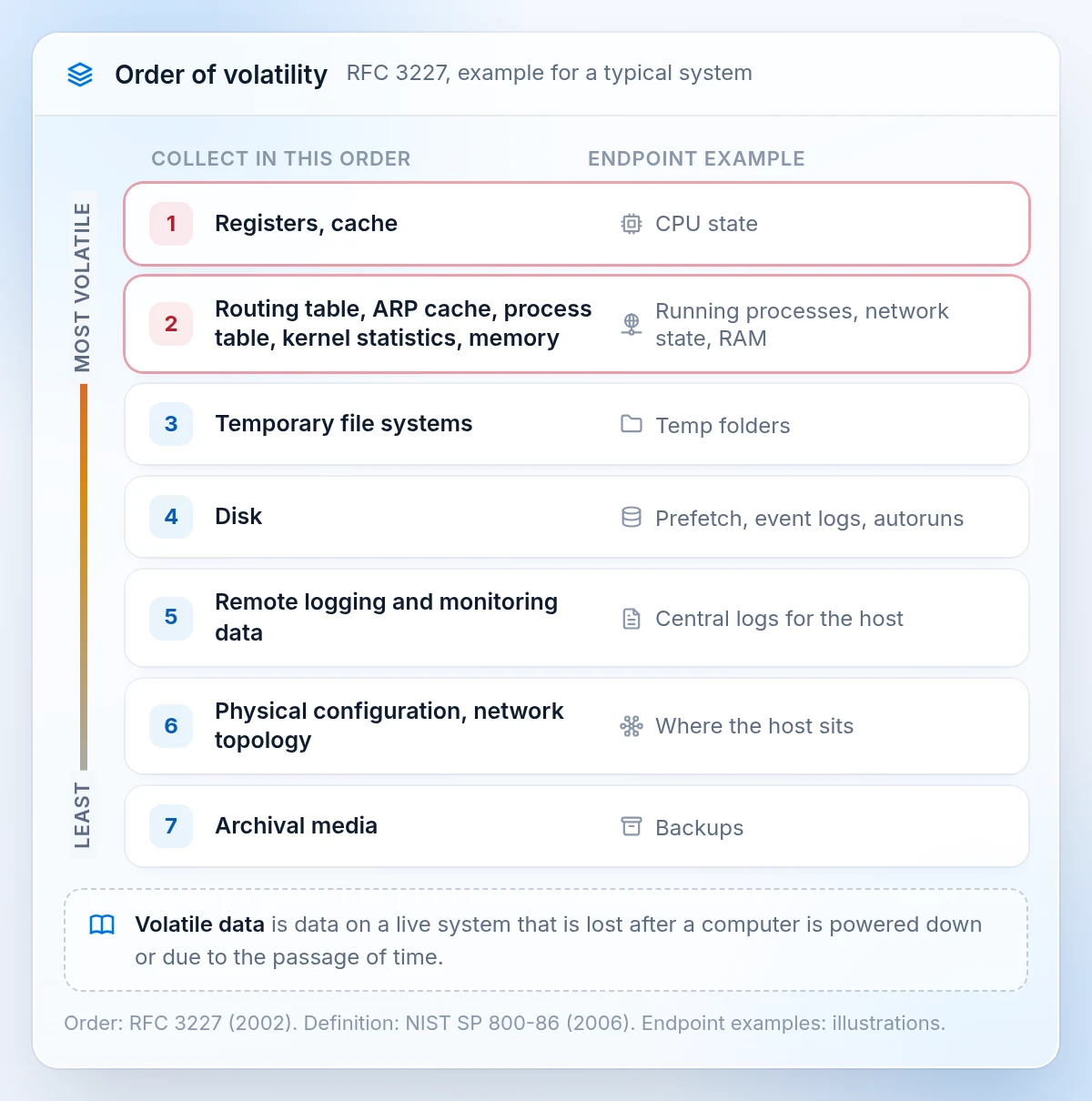
Collect endpoint evidence from the most volatile to the least volatile. RFC 3227, the IETF's 2002 guidelines for evidence collection, says to "proceed from the volatile to the less volatile" and gives an example order for a typical system:
- Registers and cache.
- Routing table, ARP cache, process table, kernel statistics and memory.
- Temporary file systems.
- Disk.
- Remote logging and monitoring data relevant to the system.
- Physical configuration and network topology.
- Archival media.
On an endpoint, the second level holds what is happening now: the process table, network state and memory. NIST SP 800-86 defines volatile data as data "lost after a computer is powered down or due to the passage of time".
Should you isolate or shut down the machine first?
Not by reflex. A common reflex is to pull the network cable or power the machine off, and both can destroy evidence. RFC 3227 says: "Don't shutdown until you've completed evidence collection. Much evidence may be lost". It also warns that disconnecting a machine from the network can trigger "deadman switches" that detect the loss of the network and wipe evidence.
Isolation is often still right, because a machine spreading an attack usually needs containing, and RFC 3227's own steps remove "external avenues for change" before collection, with that warning attached. Make it a decision: where the situation allows, capture the process list and network connections, then isolate.
Do you need a full disk image of every endpoint?
No. SP 800-86 tells analysts to prioritize data sources by factors including "Likely Value", "Volatility" and "Amount of Effort Required". It notes that bit stream images need more storage and take longer than logical backups, and that taking a critical system offline for hours to image it can disrupt the business.
The same guide says the analyst should take a bit stream image "if evidence may be needed for prosecution or disciplinary actions". NIST SP 800-61r3 adds that formal chain-of-custody procedures "might not be performed for every incident", giving the example that most malware incidents will not result in prosecution. Yet "collected incident data is still considered evidence", and the outcome NIST sets is that its integrity and provenance are preserved. So run triage collection on every endpoint in scope, and image the machines where prosecution or disciplinary action is possible.
How does automated evidence collection keep the evidence usable?
Automated evidence collection runs one collection, the same way, on every endpoint in scope and records what happened on each. SP 800-61r3 asks responders to look for signs of an incident on the assets known to be targeted and on "other potential targets". Doing that by hand across dozens of machines is slow and inconsistent.
Automation also has to keep the record RFC 3227 asks for. You should be able to "clearly describe how the evidence was found, how it was handled and everything that happened to it." The RFC also asks you to "Document each step" and to "Record the extent of the system's clock drift". A collection that failed on one machine is part of that record, because an empty result and a failed collection mean different things.
How does endpoint evidence collection work in Imperum, step by step?
Digital Forensics, Imperum's DFIR module and part of SecOps Platform, brings endpoint collection, forensic search and timeline review into one investigation workflow. This illustrative example follows a suspected compromise on one Windows workstation, with synthetic data.
Step 1: Collect the volatile artifacts from the first endpoint
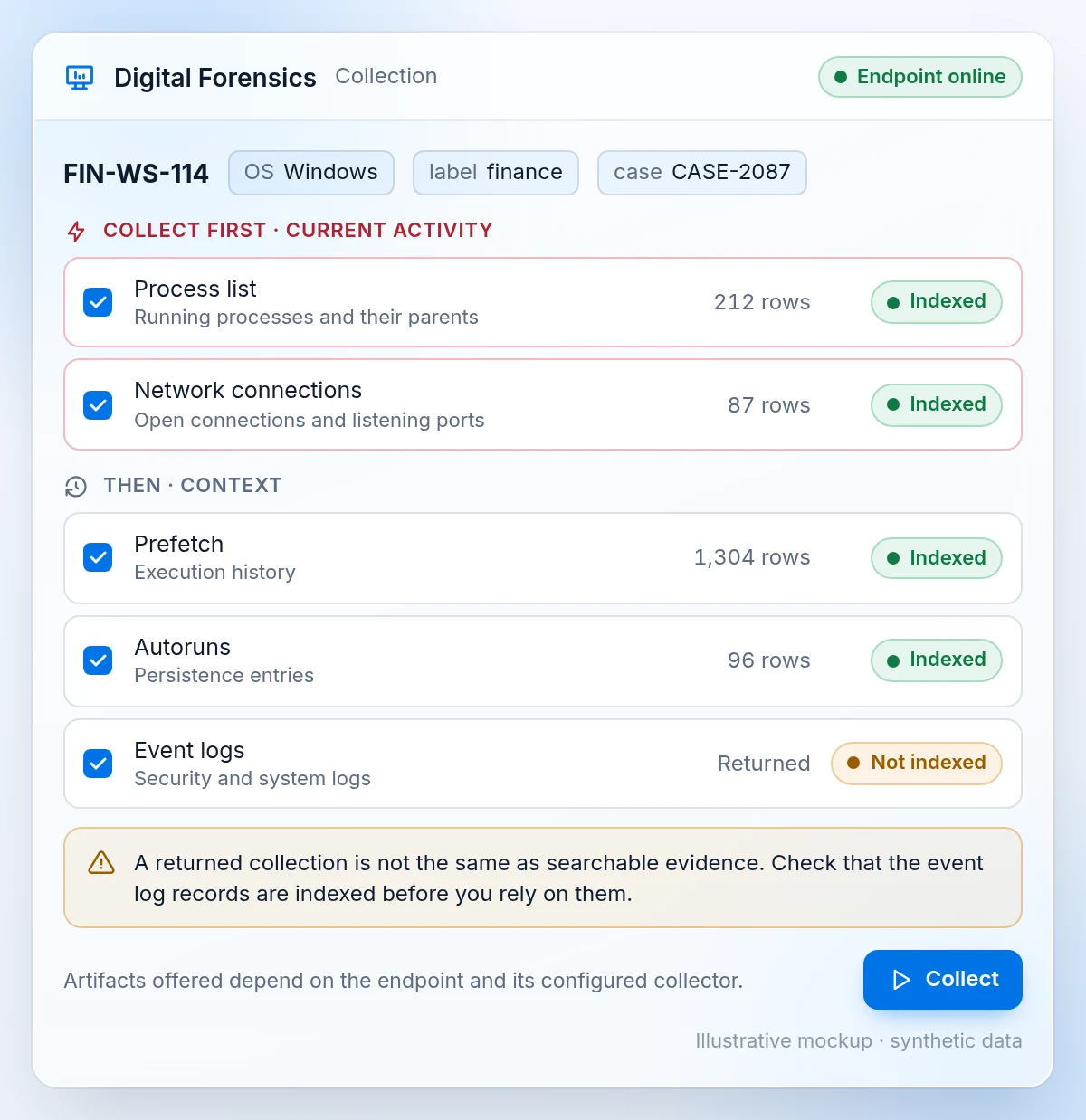
The analyst chooses the endpoint and selects artifacts appropriate to its operating system. The product's guidance is to start with volatile artifacts, such as running processes and network connections, because they disappear when an attacker cleans up or the machine reboots. Execution history, persistence and logs, such as Prefetch, event logs and autoruns on Windows, add context.
Available artifacts depend on the endpoint and its configured collector.
Step 2: Run the same collection across every endpoint in scope
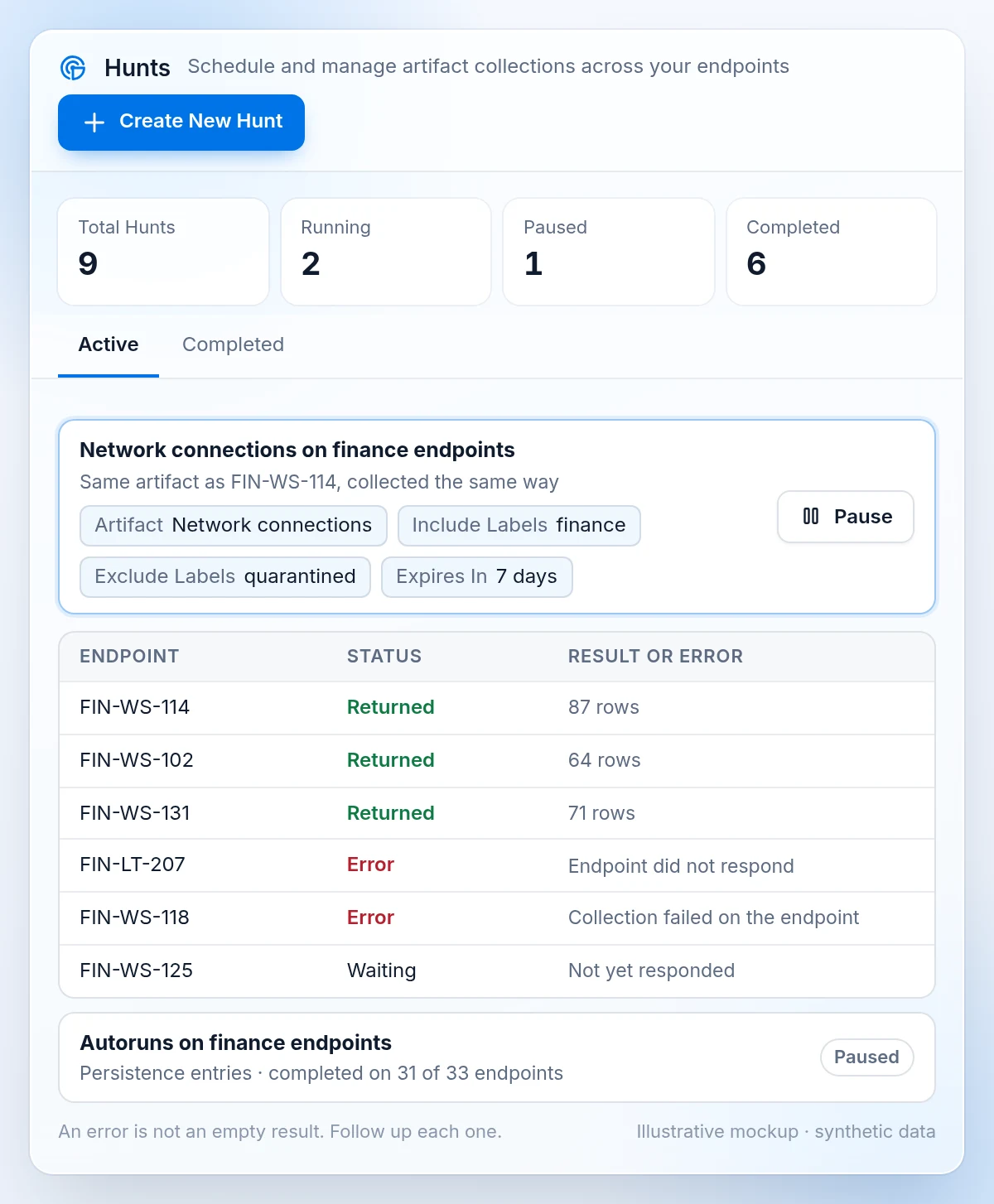
To see whether the same activity exists elsewhere, a hunt runs a selected artifact across a target group of endpoints, chosen with include and exclude labels and given an expiry. Each hunt shows results and errors per endpoint as the endpoints respond, and it can be paused, resumed or stopped. Errors are listed per endpoint beside the results, so a failed collection is not read as an empty one.
Step 3: Check what was indexed, then search and read the timeline
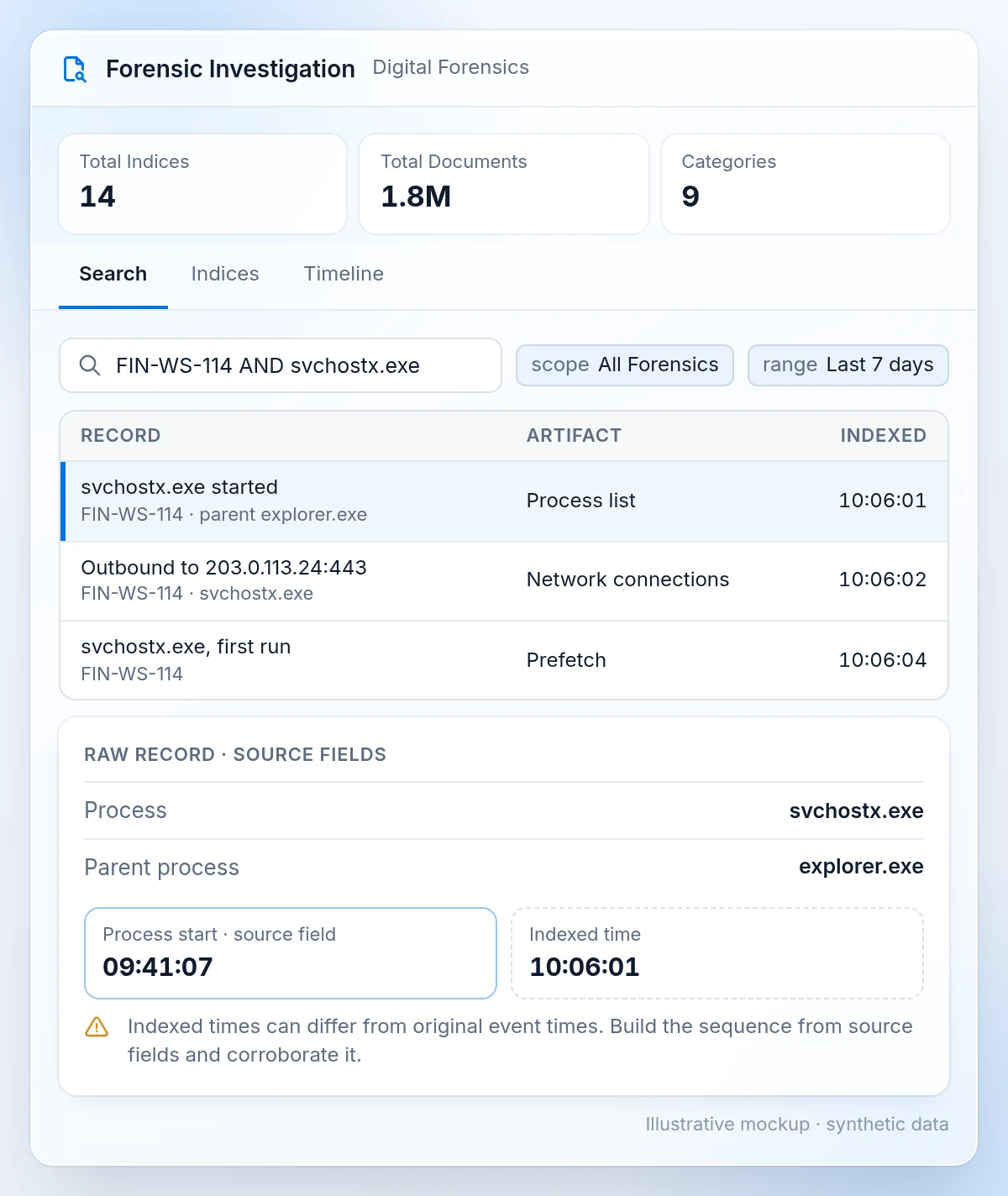
A returned collection may still have records that were not indexed, so the analyst first checks that the records needed are searchable. Then the analyst searches by endpoint, artifact and time window, narrows the timeline by event density and category, and opens each event's source fields and raw record. Some timestamps reflect indexing rather than the original event, so check the source record and corroborate the sequence before drawing a conclusion.
When an action includes case context, its audit record can carry the case, actor and target, and Casebook holds the case itself. The AI Assistant can call 29 forensic tools, and tools rated high or critical risk wait for an approval decision before they run.
What are the limits of automated collection?
Automated collection needs a configured Endpoint Agent Server, enrolled endpoints and the right permissions. Separate permissions govern search, timeline access, collection and response actions, so access to evidence does not automatically grant permission to change an endpoint.
A timeline supports your assessment, but it does not itself establish root cause or a complete chain of custody. Set and validate your own evidence-handling and retention process; a successful collection is not, on its own, proof that the evidence was fully preserved. Whether you also need specialist forensic tools depends on the evidence and analysis your team requires.
What should you check first?
- Write your order of collection into the playbook, with the step where isolation happens.
- Collect a small artifact set from one endpoint and verify it is searchable before widening the scope.
- Decide in advance which incidents get full images, and hash those images and store the hashes separately, as NIST IR 8387 recommends.
- Record clock drift and keep failed collections in the record.
Frequently asked questions
What are DFIR tools?
DFIR tools are the software used in digital forensics and incident response to collect evidence from endpoints, preserve it and examine it during an incident. They include endpoint collection agents, memory and disk imaging tools, indexed search and timelines, and case records. Good DFIR tools also show what failed, so a failed collection is not read as a clean result.
What is the order of volatility?
The order of volatility is the sequence in which evidence should be collected, from the data that disappears fastest to the data that lasts. RFC 3227's example order for a typical system starts with registers and cache, then memory and process and network tables, then temporary file systems, disk, remote logs, physical configuration and network topology, and finally archival media.
When is triage collection enough?
Triage collection may be enough when the incident is unlikely to reach prosecution or disciplinary action. NIST SP 800-61r3 notes that formal chain-of-custody handling might not be performed for every incident, while collected incident data is still considered evidence. Document where, when and by whom it was collected, and take a full image where legal steps are possible.
Can you automate digital forensics and incident response?
You can automate the repeatable parts of DFIR: running the same collection across many endpoints, indexing the results and flagging collections that failed. The judgment stays with people: which machines are in scope, when to isolate, which evidence needs a full image and what the records mean. Reading the evidence is still the analyst's job.
Next step
See how collection, search and timeline review fit together on the Digital Forensics page.