An alert fired at 02:14 am.
PowerShell has been launched by WmiPrvSE.exe on a finance workstation, and a few seconds later the same host opens an outbound connection to an address nobody recognizes. Isolating the machine takes minutes. Answering the questions that follow: How did this get here, what else did it touch, is it still running somewhere else - takes evidence.
Digital forensics and incident response (DFIR) is the discipline of investigating a security incident with forensic rigor while you are still responding to it. For a SOC, it is the point where triage ends and understanding begins.
This guide explains what DFIR is, how its two halves fit together, which evidence matters, and how SOC teams can make DFIR a repeatable workflow rather than a heroic effort - including how Imperum Digital Forensics supports it.
What is DFIR?
DFIR combines two disciplines that used to live in separate teams:
- Digital forensics is the identification, collection, preservation and analysis of digital evidence — process lists, logs, file system metadata, memory, network records — to reconstruct what happened on a system.
- Incident response is the coordinated process of detecting an incident, containing it, removing the threat, and restoring normal operations.
Each half is weaker on its own. Response without forensics risks evicting an attacker from one host while their persistence survives on five others. Forensics without response produces a thorough report about a breach that is still in progress. DFIR puts both into the same investigation: You contain on the basis of evidence, and you collect evidence with containment in mind.
The practice has also changed shape. Classic digital forensics meant powering down a machine, imaging the disk and analyzing it for weeks, often for legal proceedings. Modern DFIR is mostly live and targeted: Analysts collect specific artifacts from running endpoints, often across many machines at once, and need answers in hours.
Digital forensics vs incident response
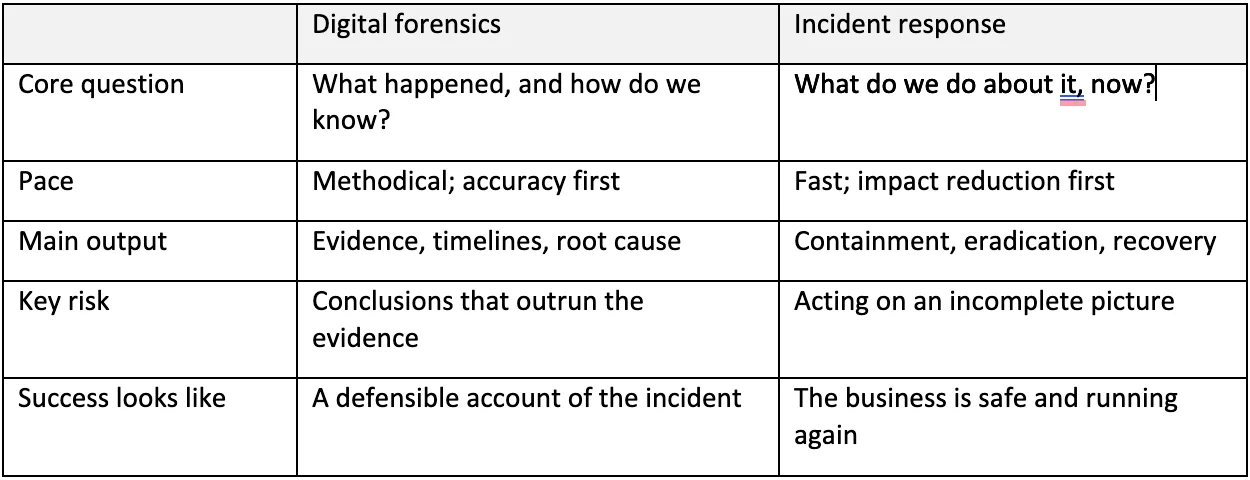
In a SOC, the same analyst often switches between both modes within the same hour. That is exactly why the tools and processes need to support both.
Why DFIR matters for SOC teams
Alerts are hypotheses, not verdicts. A detection says something that looks suspicious. Only the underlying records — the parent process, the command line, the file that was written, the logon that preceded it — tell you whether it is malicious, benign or a misconfiguration.
Scope decides the response. Containing one workstation is easy. Knowing whether the same persistence mechanism exists on 40 others is what determines whether the incident is actually over.
Root cause improves detection. Every investigation that ends with "here is how they got in and what we missed" is an input to detection engineering. Without forensics, the same gap stays open for the next attacker.
Accountability has deadlines. Regulations such as GDPR, NIS2 and DORA set notification timelines and expect organizations to explain what was affected. Insurers, auditors, and legal teams ask the same questions. Those answers depend on evidence that was collected and handled properly.
The DFIR lifecycle
Most teams build on NIST SP 800-61 (revised in 2025 to align with the NIST Cybersecurity Framework 2.0) or the SANS PICERL model. Whichever you follow, forensics plays a role in every phase:
- Preparation. Deploy collectors before you need them, define artifact sets per operating system, agree who may collect and who may act, and keep clocks synchronized. Most DFIR failures are preparation failures discovered during an incident.
- Identification and analysis. Triage the alert, collect a focused set of artifacts from the affected host, and establish an initial scope.
- Containment. Where the situation allows, capture volatile evidence — running processes, network connections, memory — before isolating or rebooting a machine, because it disappears.
- Eradication. Remove the threat everywhere it exists. This requires a complete picture of persistence, accounts, and lateral movement, which only forensic scoping provides.
- Recovery. Restore systems and watch for re-entry using the indicators found during the investigation.
- Lessons learned. Turn the timeline into a report, detection improvements, and changes to the playbook.
What evidence DFIR teams collect
Evidence is collected roughly in order of volatility (described in RFC 3227): the most short-lived data first, because it is the first to be lost.
- Memory, running processes and active network connections
- Temporary files and system state
- Disk artifacts and file system metadata
- Logs, locally and in central platforms
- Backups and archived data
On endpoints, the useful artifacts depend on the operating system:
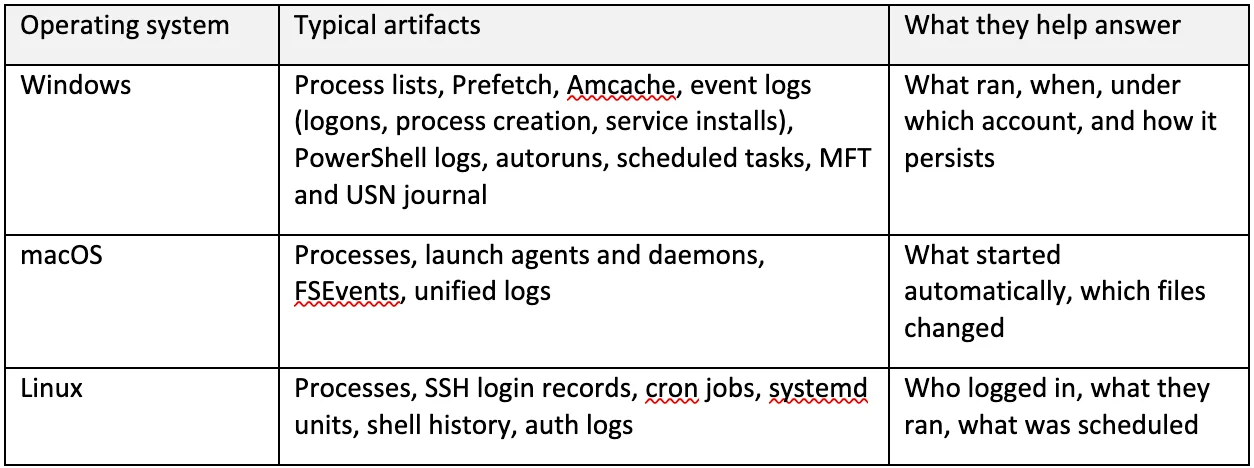
Endpoint evidence rarely tells the whole story. Identity provider sign-in logs, cloud audit logs, email gateway records, DNS, proxy and firewall logs, and EDR telemetry fill in how the attacker arrived and where they went next.
A DFIR investigation, step by step
Going back to the 02:14 alert, a practical SOC workflow looks like this:
- Scope the question. Start with the affected endpoint and a specific question: was this PowerShell process expected here?
- Collect what the question needs. Pull a targeted artifact set — process list, network connections, autoruns, recent execution history — rather than imaging everything.
- Search the evidence. Look for the suspicious hash, domain, command line or file path across the collected and already-indexed records.
- Build the timeline. Order events by time and category — process, network, file system, persistence — and narrow to the window that matters.
- Inspect the source record. Open each relevant event and check the original fields: artifact name, parent process, original timestamp. A category or severity label is a hint, not a verdict.
- Widen the scope deliberately. If you find an autorun entry called "Updater" pointing to an unusual path, hunt for it across the relevant group of endpoints and review results as hosts respond.
- Act and record. Contain, eradicate and document — with every collection and response action tied to the case, so the investigation can be reviewed later.
This is the workflow Imperum Digital Forensics is built around: scope, collect, search and inspect, with the evidence kept in view throughout.
Pitfalls to avoid
- Trusting the wrong timestamp. The time an event was ingested or indexed is not always the time it happened. Time zones, clock drift and deliberate timestamp tampering add further noise. Compare original timestamps before concluding anything about sequence or dwell time.
- Treating absence as proof. A missing record may mean nothing happened — or that collection failed, the log rolled over or the artifact is not supported on that host. Check collection status before ruling things out.
- Letting the timeline becomes the conclusion. A timeline organizes evidence; it does not establish root cause on its own. Corroborate across sources.
Common DFIR challenges
Scale. Full disk imaging does not scale to an incident touching hundreds of endpoints. Targeted collection and fleet-wide hunts do.
Tool sprawl. Evidence often lives in an EDR console, a SIEM, a forensic tool, and a ticketing system. Every switch costs time and context.
Evidence handling. Investigations that may end in legal action, insurance claims or regulatory reporting need clear records of who collected what, when and why.
Access control. The right to view evidence should not automatically include the right to change an endpoint. Separating search, collection and response permissions protect both the investigation and the environment.
Skills. Experienced DFIR analysts are scarce. Repeatable workflows and good tooling let junior analysts do more of the work safely and leave senior staff for the hard calls.
How to build DFIR capability into your SOC
- Deploy collection before the incident. Enrol endpoints, test that collection works, and verify the results are searchable.
- Standardise artifact packs. Define what to collect for common scenarios — ransomware, business email compromise, suspicious PowerShell, insider activity — per operating system.
- Set log retention to match dwell time. Logs that roll over after seven days cannot explain an intrusion that started a month ago.
- Link every forensic action to a case. Collections, downloads, and response actions should carry the case reference, the analyst, and the target.
- Practise. Tabletop exercises and purple team runs reveal gaps in access, tooling and decision-making before a real incident does.
- Close the loop with detection. Each investigation should end with at least one question: what would have caught this earlier?
- Know when to escalate. Decide in advance when you will bring in an external IR retainer and what evidence they will expect to receive.
Where automation and AI fit in DFIR
Automation removes the repetitive parts of DFIR: kicking off a standard collection when a specific alert fires, enriching indicators, opening a case and attaching the evidence. AI assistants go a step further by querying forensic data, retrieving timelines and running focused hunts on request, which shortens the path from question to evidence.
The guardrails matter as much as the speed. High-risk actions such as isolating a host or deleting a file should require explicit approval, and the analyst — not the model — remains responsible for deciding what the evidence means. Used this way, AI gives DFIR teams more time for judgement rather than replacing it.
DFIR with Imperum
Imperum Digital Forensics brings endpoint collection, forensic search and timeline review into one investigation workflow as part of the Imperum SecOps Platform:
- OS-aware collection for Windows, macOS and Linux, from process lists and Prefetch to launch agents, FSEvents, SSH logins and cron jobs.
- Hunts that run a selected artifact across a target group, include and exclude labels and an expiry, so you can widen scope deliberately.
- Search and timeline views with category lanes for process, network, file system and persistence events, and one click to the source record behind each event.
- Separate permissions for search, timelines, collection and response actions, so access to evidence does not grant the right to change an endpoint.
- Case-linked audit records that carry the case reference, actor and target, connecting forensic work to the wider investigation in Casebook.
- AI Assistant hunt mode that can query forensic data, retrieve timelines and work with hunts, with approval required before high-risk tools run.
Bring an incident and follow the evidence: book a forensic workflow demo.