
 Start with onboarding





Detection as code means writing detection logic as versioned, tested rules, and it suits CVE-2026-123158. The OpenSSH bug, nicknamed *sshole, lets an overlong password into accounts that have no password on musl-based Linux such as Alpine. Fixed Alpine packages keep their old OpenSSH version, so version scanners mislead. A tested Sigma rule on the login logs does not.
What is the *sshole OpenSSH bug?
*sshole is the researcher's name for CVE-2026-123158, a flaw in the OpenSSH server on Linux systems that use the musl C library without PAM, as Alpine Linux does. There, a password 257 to 1024 bytes long can log in to an account that has no password.
Özgün Kültekin of Wakefield found it with AI help ("i had agent swarms. a lot of them."), and OpenSSH shipped the fix, version 10.6p2, on November 5. Damien Miller of OpenSSH said the team moved within a day after seeing "rapid bug rediscovery by AI agents, sometimes within hours."
How can a long password open an account that has none?
On Alpine, accounts that should never log in with a password, such as root, store a * instead of a scrambled (hashed) password. For such an account, sshd still hashes the typed password with settings borrowed from another account, so the timing does not reveal which accounts exist.
musl's hashing function refuses passwords over 256 bytes and returns * to signal the error. As Alpine's advisory puts it, "* is also exactly what the stored field contains for every account with no password, so the "hash" matches and the login succeeds."
One quirk: the first try on a connection fails, and a second try on the same connection gets in.
OpenSSH and musl each say the cause sits with the other. OpenSSH 10.6p2 now refuses a match against a stored value shorter than four characters.
Which systems does *sshole affect?
Alpine's advisory says a system is exposed only when all of these hold:
- OpenSSH runs without PAM, as Alpine's
openssh-serverpackage does. PasswordAuthentication yes, OpenSSH's default, is set.- An account has
*in its password field: root, a key-only user or thealpineuser in Alpine's official cloud images. - At least one account on the machine has a real password.
Root also needs PermitRootLogin yes, but any account that can become root, such as through doas, will do.
Alpine lists every release from 3.16 to 3.24 as affected. Systems that use glibc or PAM are safe, as are Dropbear servers and containers without an SSH server.
Is stock OpenWrt affected?
No. The researcher's write-up lists OpenWrt next to Alpine as a musl system, yet a stock OpenWrt router runs Dropbear as its SSH server, as Ars Technica notes. Only a router with the optional openssh-server package installed is exposed, and OpenWrt's package feed shipped the fix on November 5.
Is *sshole being exploited?
Yes. A honeypot operator told Help Net Security its "first observed attempt arrived less than nine hours after CVE publication," and that it confirmed root access on a honeypot running real Alpine Linux and OpenSSH.
A sensor network logged its first successful exploitation on November 7 at 00:46 UTC; the attacker then ran id and uname -a. One security research team called it "botnets and crypto miners" for now. As of November 9, CVE-2026-123158 was not in CISA's Known Exploited Vulnerabilities catalog.
Why do version scanners get *sshole wrong?
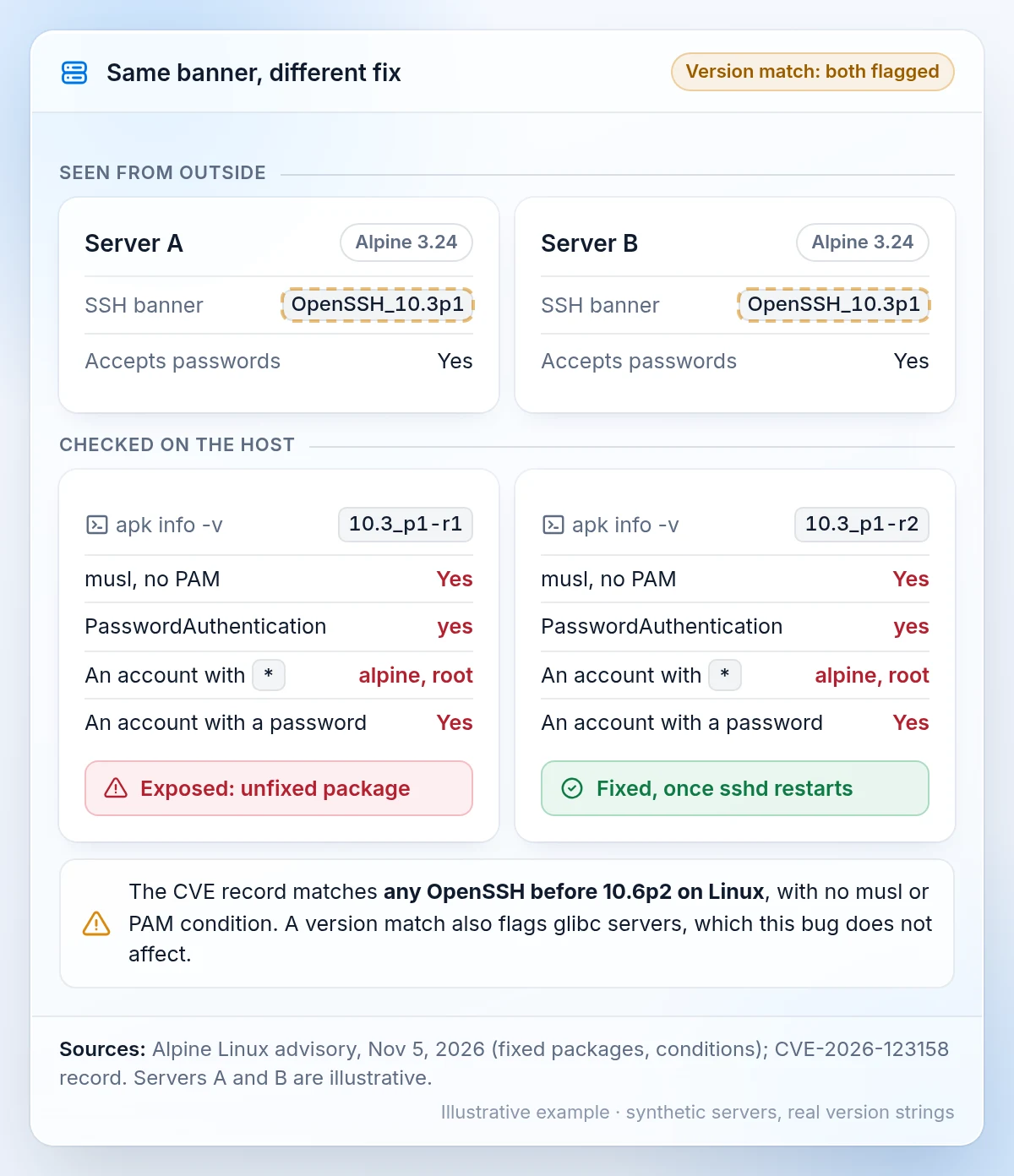
A version check can't tell a fixed Alpine server from a vulnerable one. Alpine backported the fix into its existing packages without changing the OpenSSH version, so a patched Alpine 3.24 server still reports OpenSSH_10.3p1. Only the package release shows the fix: on 3.24, 10.3_p1-r2 is fixed.
The CVE record matches every OpenSSH before 10.6p2 on Linux, with no condition for musl or PAM, so a version match also flags glibc servers, which are safe. From outside you see only the version banner and whether a server accepts passwords. musl, PAM and account states need a check on the host.
What does an *sshole login look like in the logs?
Alpine says to look in /var/log/messages for "Accepted password" lines on accounts with no password. A lab reproduction published on November 6 shows the full pattern on an unpatched Alpine 3.24:
sshd-session[1926]: Failed password for alpine from 10.0.2.2 port 59008 ssh2
sshd-session[1926]: Accepted password for alpine from 10.0.2.2 port 59008 ssh2
A failure, then a success, for a passwordless account, from the same process ID and source port: one connection. Network traffic helps little, because SSH is encrypted.
Since OpenSSH 9.8, some of these lines come from sshd-session, so a rule that only matches sshd can miss them.
How does detection as code work, step by step in Imperum?
In Imperum, detection as code for this bug takes three steps: find the servers, write and test the rule, then keep it fed with data. This illustrative example uses Detection Lake and Virtus Optimus, the Imperum module for detection as code. The screens use synthetic data.
Step 1: Find the servers the rule must cover
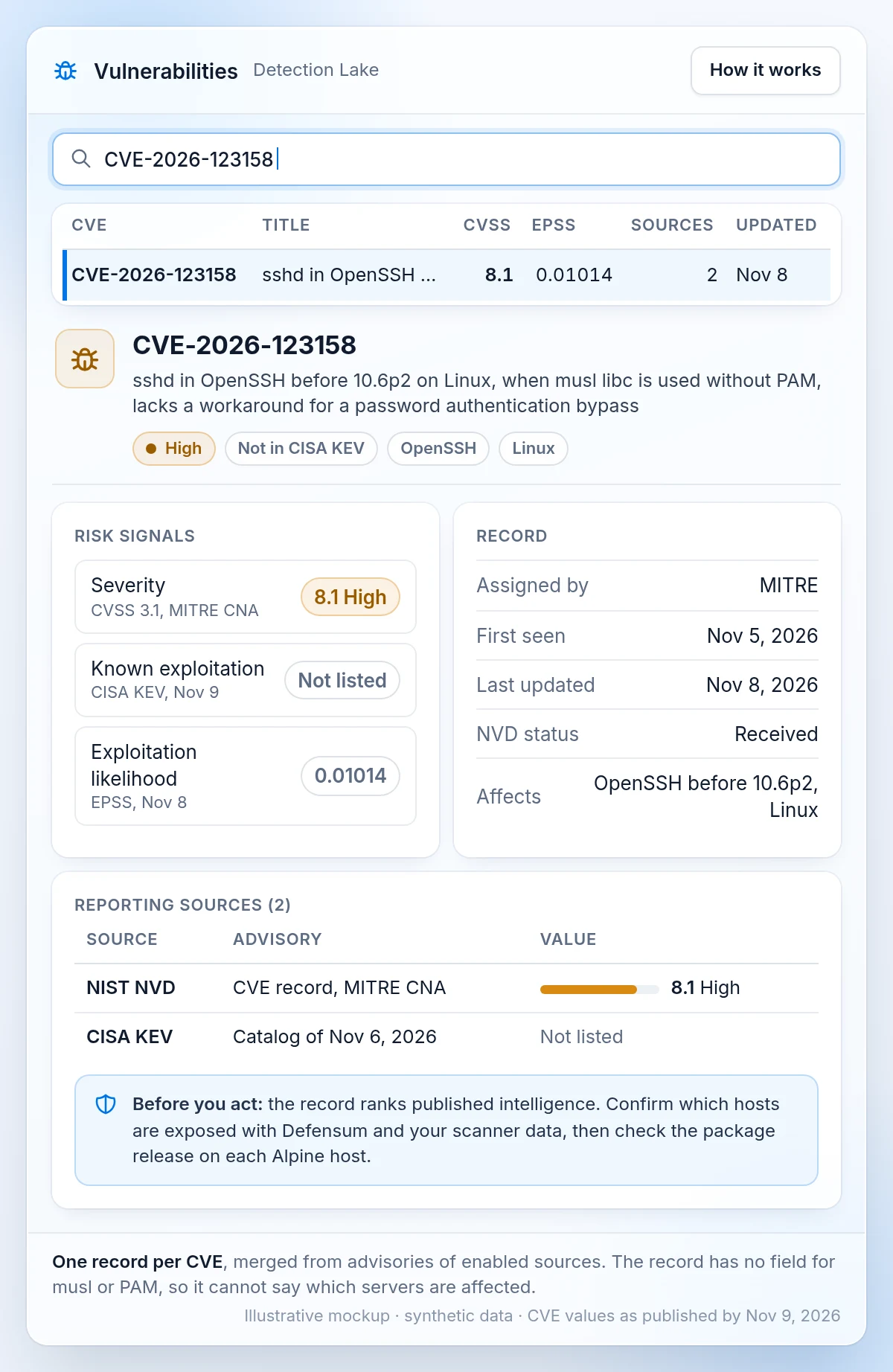
In Detection Lake, the Vulnerabilities page merges advisories from enabled sources into one record per CVE, with severity, known exploitation and exploitation likelihood. That ranks published intelligence; it does not show which of your servers are exposed.
Defensum, Imperum's module for continuous threat exposure management, collects vulnerability findings through configured connectors and adds asset and exposure context. Treat a scanner hit as a lead here. On each Alpine host, apk info -v openssh-server shows the package release, and sshd -T | grep -i passwordauthentication shows whether passwords are on.
Step 2: Write, test and deploy the Sigma rule
Sigma detection rules are written in a shared YAML format. The example pairs two plain rules by process ID, source IP and port, and matches both process names. Map the field names to your log parser first.
# Example only: test against your own logs before use.
# Field names depend on how your pipeline parses sshd syslog lines.
title: SSH password failure for a passwordless account
id: 984d3d60-58d2-41fe-ab63-ed3fc2ee54db
name: sshd_nopw_failed_password
status: experimental
logsource:
  product: linux
  service: sshd
detection:
  selection:
    ProcessName:
      - sshd           # OpenSSH before 9.8
      - sshd-session   # OpenSSH 9.8 and later
    Message|startswith: 'Failed password for '
    User:              # accounts whose password field is *
      - alpine
      - root
  condition: selection
level: low
---
title: SSH password login for a passwordless account
id: ea38ba32-a73a-4a50-90fe-04bb5f3632c9
name: sshd_nopw_accepted_password
status: experimental
logsource:
  product: linux
  service: sshd
detection:
  selection:
    ProcessName:
      - sshd
      - sshd-session
    Message|startswith: 'Accepted password for '
    User:
      - alpine
      - root
  condition: selection
level: high
---
title: Failed then accepted SSH password on one connection (CVE-2026-123158)
id: c5a19bc5-5994-401d-bb6e-169ef9380ae9
status: experimental
references:
  - https://alpinelinux.org/posts/2026-11-05-openssh-password-authentication-bypass/
correlation:
  type: temporal_ordered
  rules:
    - sshd_nopw_failed_password
    - sshd_nopw_accepted_password
  group-by:
    - ProcessId
    - SourceIp
    - SourcePort
    - User
  timespan: 5m
level: critical
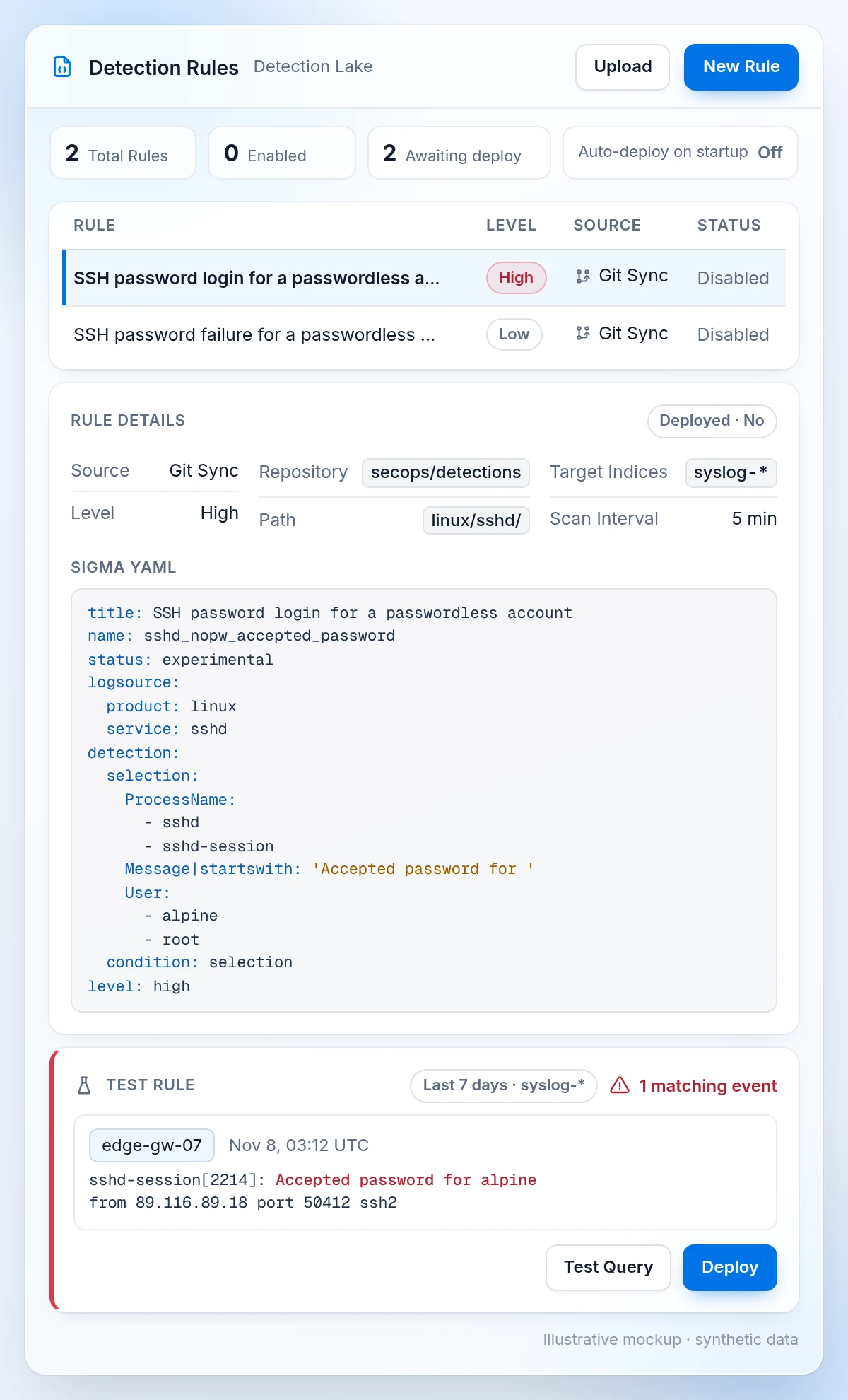
In Detection Lake, write or import a Sigma rule, test it against compatible log data, then deploy it on a schedule. Keep rules in Git when you need a versioned source. The data must already be indexed with the fields the rule expects, and automatic deployment is off on a fresh installation, so deploying is a deliberate step. Rule findings can then appear in Alerts with their detection context.
The "Accepted password" rule also works on its own. The pair rule uses Sigma's correlation format, so check that your platform supports it.
Step 3: Keep the rule fed with Virtus Optimus
Virtus Optimus maintains the detection rules across your connected security tools. If your SSH logs go to another SIEM connected to Optimus, Optimus Architect can draft the detection there, grounded in that platform's schema. Capabilities vary by target, and checks support review without proving the rule will fire.
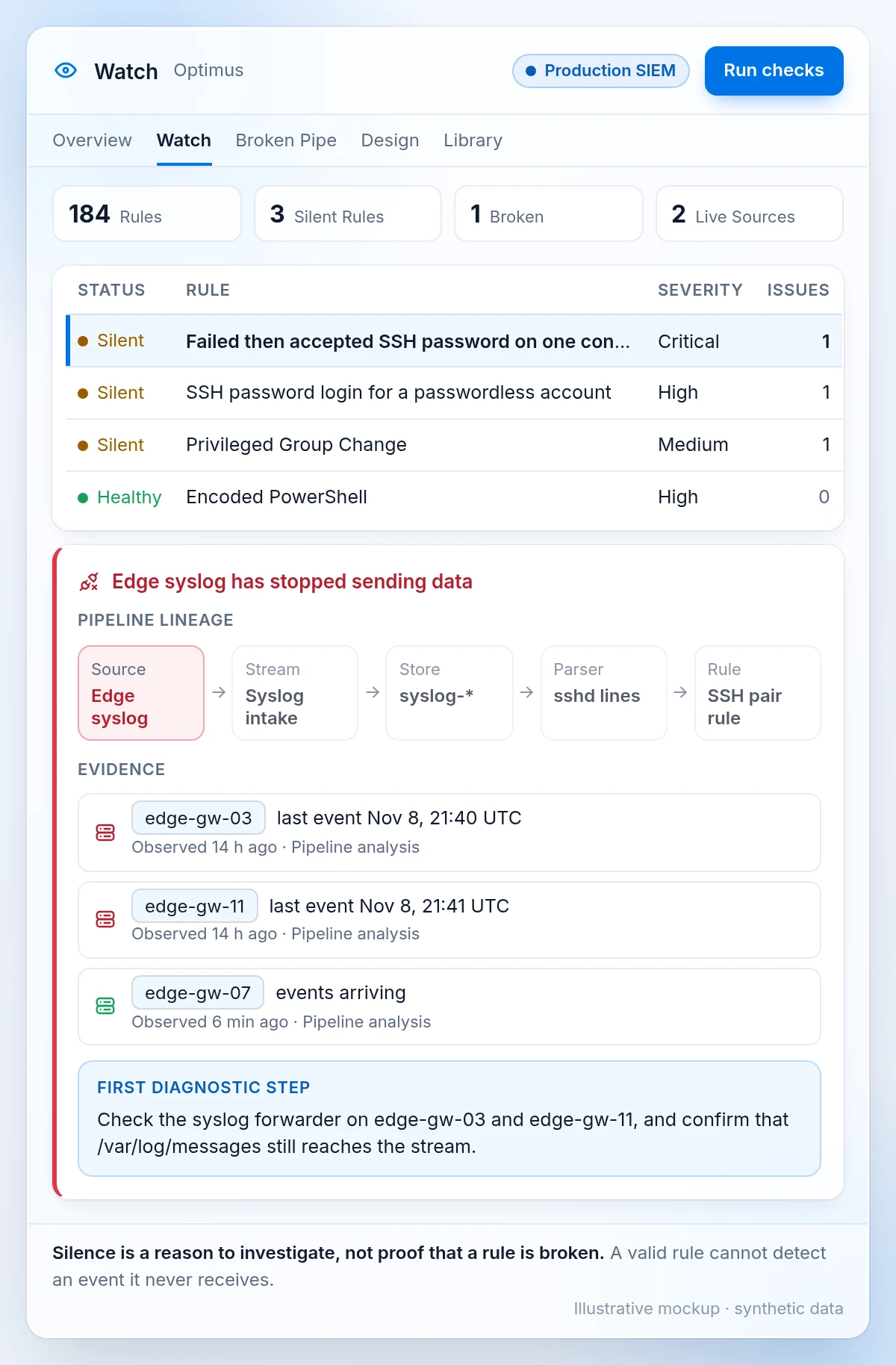
This rule should stay quiet. Watch shows silent detections, and silence is a reason to investigate, not proof that a rule is broken. Missing data is the bigger risk: a valid rule cannot detect an event it never receives. Broken Pipe flags stopped ingestion and parser drift, such as edge hosts whose syslog stopped arriving.
What should you check this week?
- Upgrade
openssh-serverto your release's fixed package, then restart sshd, because the upgrade leaves the running server alone. - Where you can't upgrade yet, set
PasswordAuthentication noand confirm it withsshd -T. - Search
/var/log/messagesfor "Accepted password" on accounts whose password field is*. If you can't rule out a login, treat the machine as compromised. - Check the
authorized_keysfiles of root andalpinefor keys you did not add. One key seen in attacks carries the commentSSHHOLE-HIT.
Questions about the *sshole OpenSSH bug
What is detection as code?
Detection as code is the practice of managing detection rules the way developers manage code: in a shared format, under version control, tested before deployment and changed through review. For CVE-2026-123158, it means one Sigma rule for the failed-then-accepted login pair, kept in Git, tested against your SSH logs and watched for silence after it goes live.
What is detection engineering?
Detection engineering is the work of designing, testing and maintaining the rules that turn logs into alerts. It covers choosing the data source, writing the logic, checking it against real events and keeping it working when formats change. The sshd-session process name in OpenSSH 9.8 is a typical case: a rule that only matches sshd can miss these logins.
Are Sigma detection rules enough to fix *sshole?
No. A Sigma rule tells you a login happened; it does not block one. Patch first: install your release's fixed openssh-server package and restart sshd, or set PasswordAuthentication no. Sigma detection rules then cover the hours before patching and any host you missed, and they show which machines to investigate.
Is my Alpine container affected by CVE-2026-123158?
Only if it runs an SSH server. Alpine says containers that do not run sshd are not affected, which matters for an image Ars Technica says has more than 1 billion Docker Hub downloads. A container that runs openssh-server with password logins on, a * account and one account with a password is exposed like any other host.