





Removing a malicious extension does not remove everything it installed. After Cursor's marketplace served a tampered Claude Code extension for about 11 hours on October 29, developer machines need checking for a planted SSH key and startup scripts. Proactive threat hunting uses those published clues to find what remains, even after an update.
What happened to the Claude Code extension in Cursor?
Cursor's extension marketplace distributed tampered versions of Claude Code between 09:27 and 20:35 UTC on October 29. Cursor is an AI code editor, and its marketplace is where users get extensions that add functionality.
The affected versions were 2.1.312 and 2.1.313. Cursor says neither was developed by Anthropic. The attacker had changed three files in the legitimate 2.1.312 package. No other marketplace distributed the tampered build, according to BleepingComputer.
Cursor removed it. In a post on X, quoted by ISMG, Cursor said the incident affected "at most 5,000 users". That is an upper limit, not a confirmed installation count. Cursor has not disclosed how the build reached its marketplace, and the attacker has not been identified.
How can an editor extension plant a backdoor?
An extension runs with the same permissions as the editor. Because the editor runs as you, an extension can read and write your files and start other programs.
This extension needed no further click. A script added to the top of its main file ran when the editor loaded it:
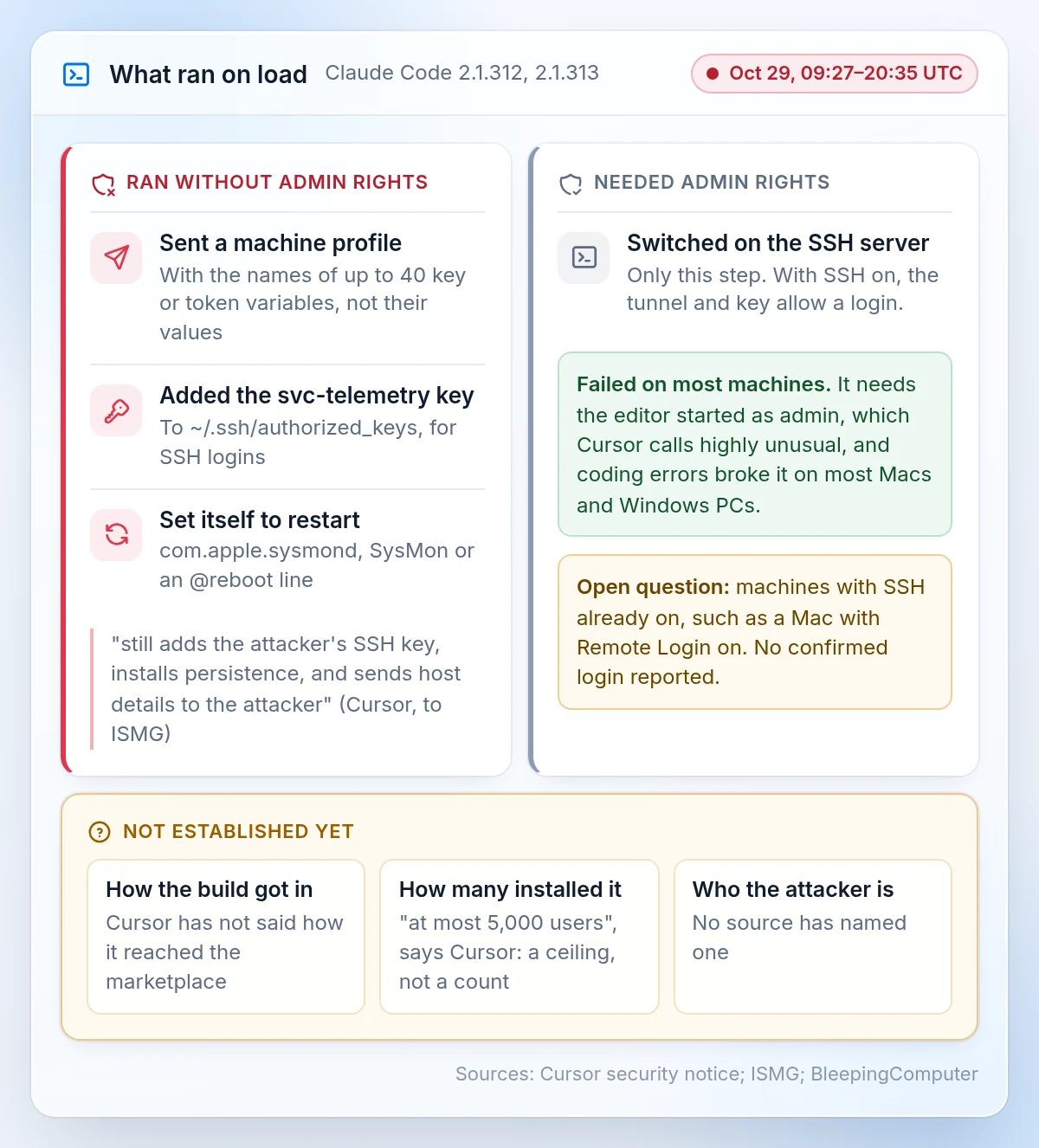
- It sent the attacker a profile of the machine, including the names of up to 40 environment variables that looked like keys or tokens. It collected their names, never their values.
- It added the attacker's key to
~/.ssh/authorized_keyswith the labelsvc-telemetry. SSH allows remote login; this file lists the keys accepted for access. - It tried to enable the machine's SSH server and opened an outbound tunnel to 134.209.82.225. With SSH running, the attacker could use that tunnel and the planted key to log in.
- It installed startup entries to run again after a reboot.
Cursor lists affected packages for macOS and Windows. The script also contains a Linux branch.
Did the attacker need admin rights?
Only the step that enabled the SSH server needed administrator privileges. Cursor says it would fail unless the editor had been started with those privileges, which it describes as highly unusual. Coding errors also broke that step on most Mac and Windows machines.
That blocked access through the tunnel where SSH was not already running. Machines with SSH already enabled, such as a Mac with Remote Login on, remain the open question. The sources have not reported a confirmed login on those machines.
The other actions did not need admin rights. As Cursor told ISMG, the extension "still adds the attacker's SSH key, installs persistence, and sends host details to the attacker." Persistence means the startup entries that let the script run again.
Does removing the extension remove the backdoor?
No. The extension leaves separate startup scripts behind. Cursor warns that "uninstalling the extension may not be sufficient". The attacker's server has been offline since October 30, so the tunnel no longer connects to it. The planted key and startup entries remain until removed.
Cursor's notice lists the indicators, or traces, to check:
- The
svc-telemetrykey in~/.ssh/authorized_keys. Match the fingerprint in Cursor's notice, not just the label. - macOS: a LaunchAgent called
com.apple.sysmondthat runs~/.config/.smt. - Windows: a scheduled task called
SysMon. - Linux: an
@rebootline in the crontab. - Network: traffic to 134.209.82.225 on port 22 or 8099.
How does proactive threat hunting work, step by step in Imperum?
Start with the published indicators, check the machines for startup entries, and keep the evidence in a case. This illustrative example follows Imperum's workflow for threat hunting and DFIR teams. DFIR means digital forensics and incident response. The screens use synthetic data.
Step 1: Search for connections with Deep Hunt
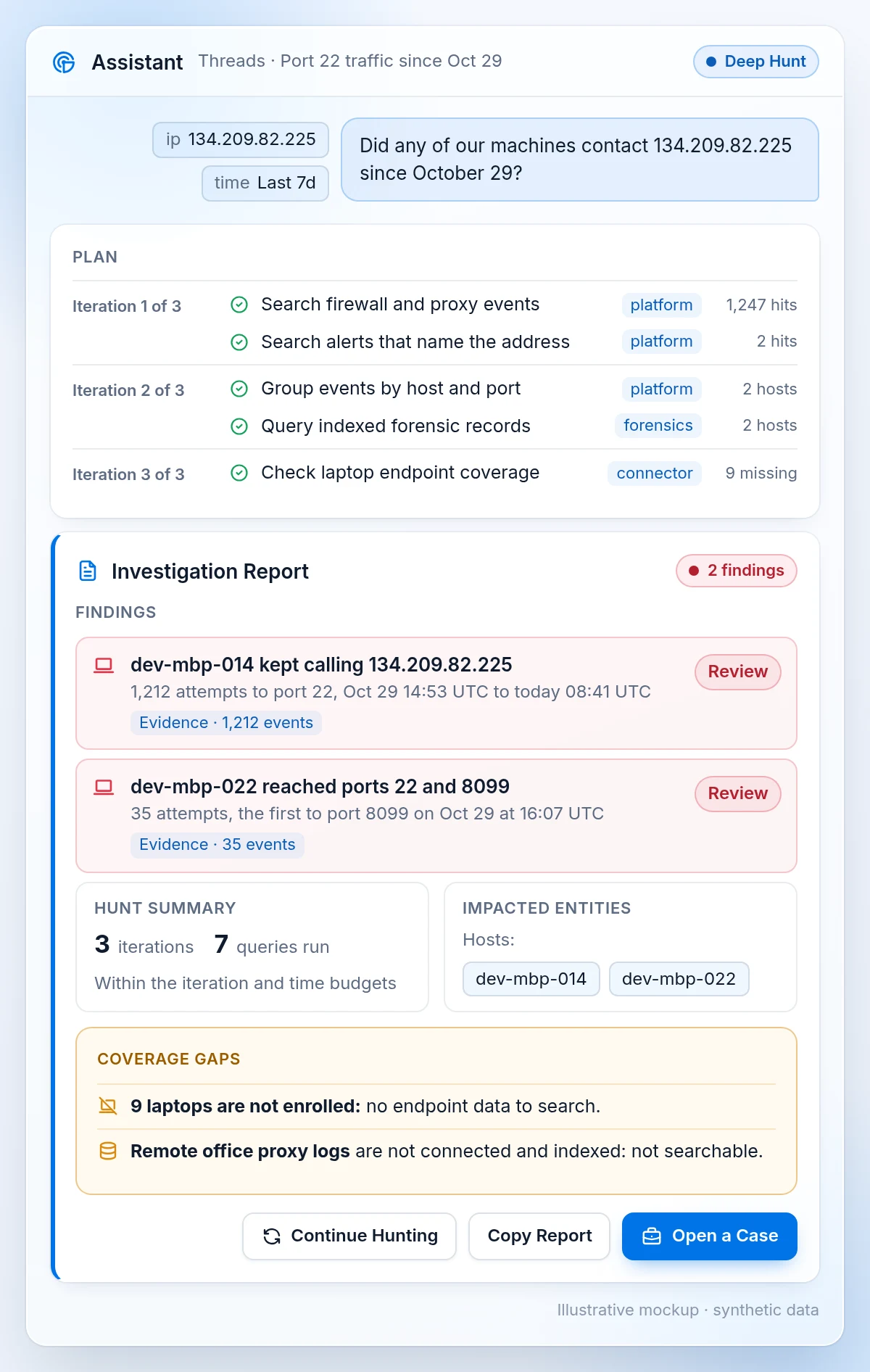
The tunnel script retries every 60 seconds. A machine that still carries it may keep trying to reach 134.209.82.225. In the AI Assistant, enable Deep Hunt and ask: did any of our machines contact 134.209.82.225 since October 29?
Deep Hunt plans and runs available queries and tools, assesses the findings, and continues within its iteration and time budgets. Its report lists findings and coverage gaps. Read both: a source that has not been connected and indexed cannot be searched, and the Assistant says so. Deep Hunt requires Assistant Threads to be enabled, appropriate permissions and available data.
Step 2: Check startup entries with Digital Forensics
In Digital Forensics, part of the Imperum SecOps Platform, a hunt collects a selected artifact across machines chosen by label. An artifact is a type of evidence, such as running processes or startup entries. Results and errors are shown for each machine.
Run separate hunts for each operating system: launch agents on macOS, cron jobs on Linux, and autoruns on Windows. The chosen artifact must be supported by the endpoint's configured collector. Hunts require a connected Endpoint Agent Server, enrolled machines and the relevant permissions. Check unenrolled laptops by hand.
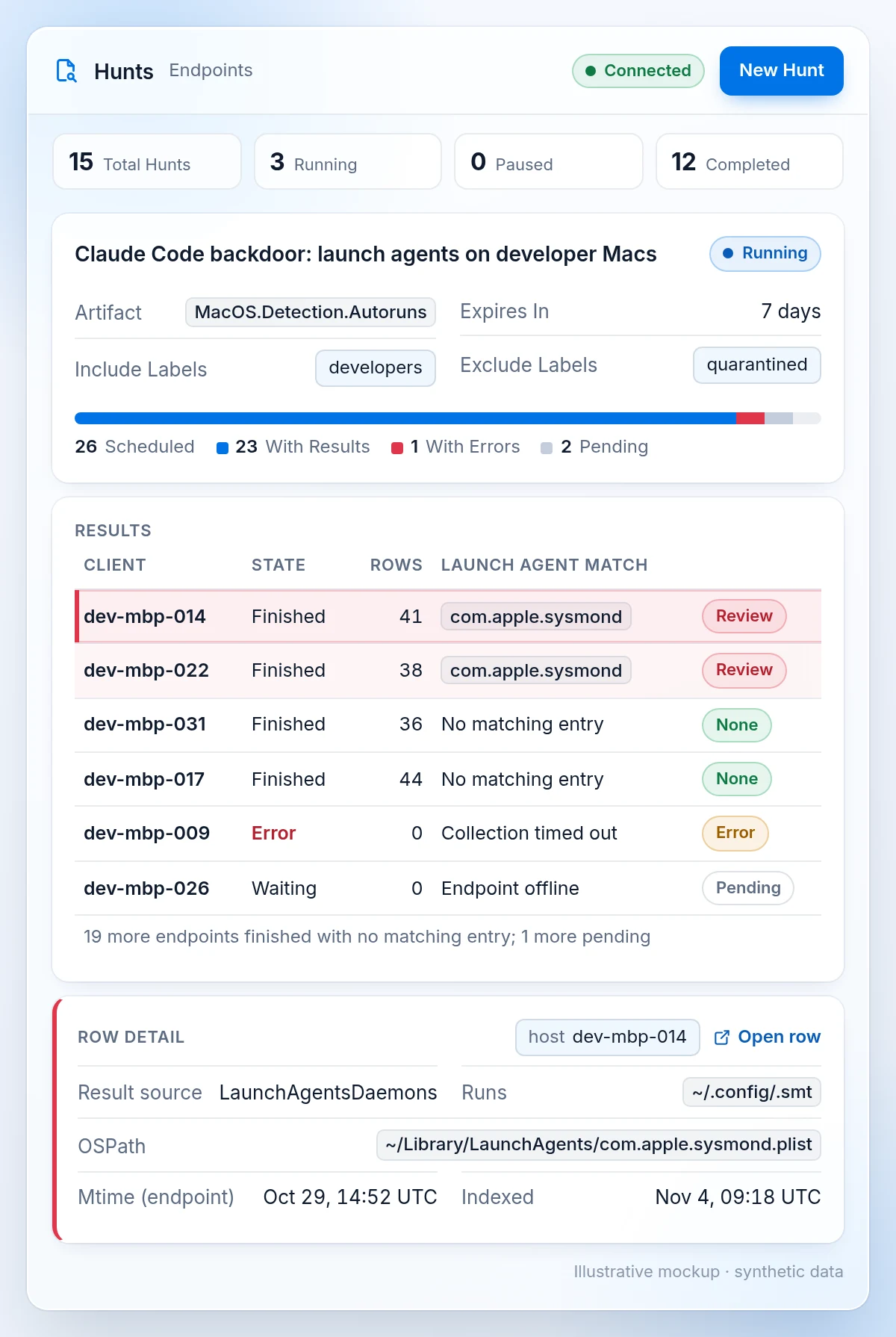
Treat a hit as a lead to investigate. Open the source record and check its timestamps, because indexed times can differ from original event times. Collect the evidence before removing anything.
Step 3: Keep the evidence and cleanup decision in a case
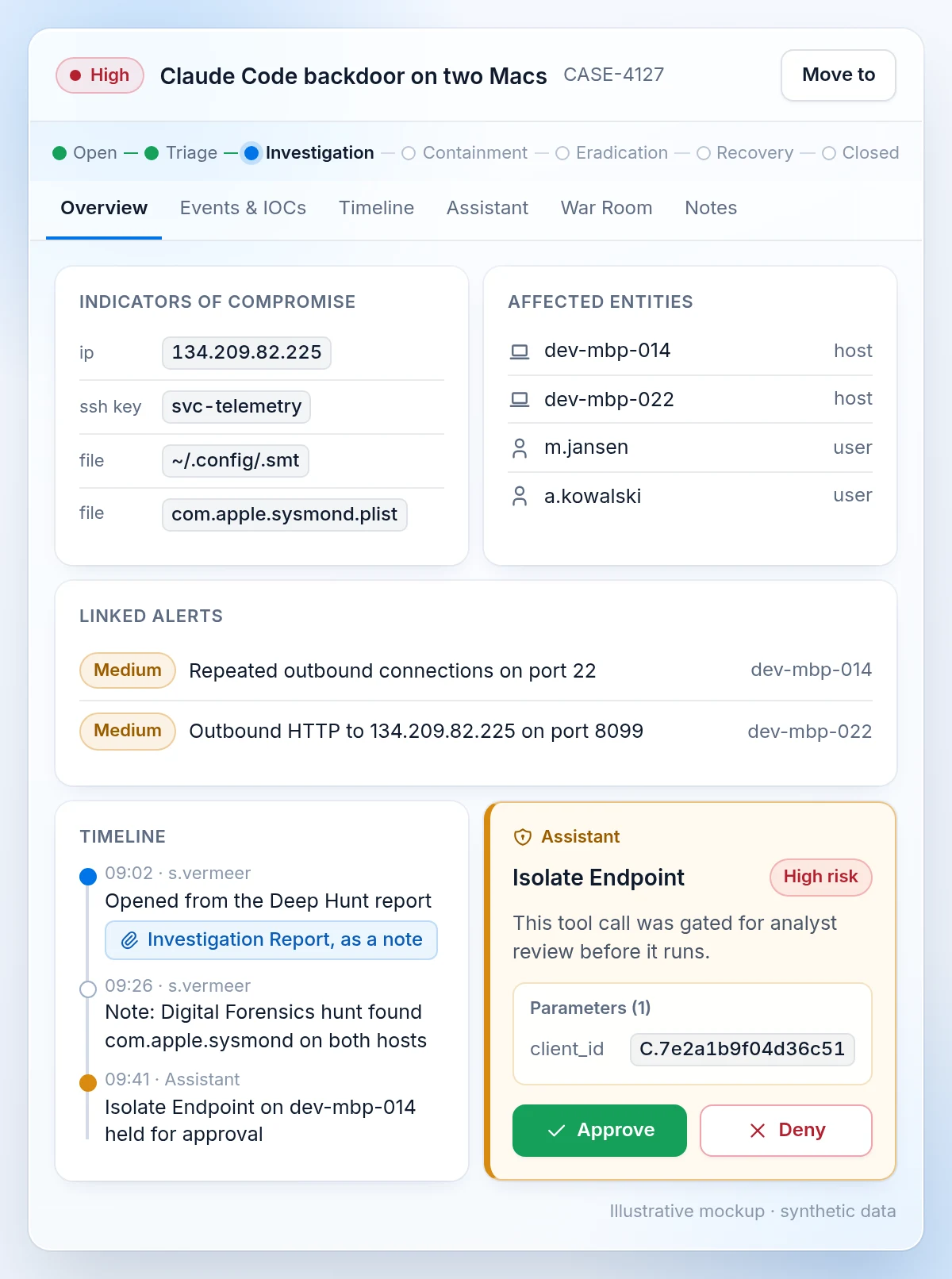
Open a case in Casebook from the saved Deep Hunt report, or attach the report as a note while working inside a case. Keep the alerts, indicators, affected machines and investigation notes together.
Cursor advises isolating machines with evidence, removing the key, startup entries and tunnel, and rotating credentials from a trusted system. In Imperum, risk rules and configured approvals govern actions such as endpoint isolation. The illustrative Assistant isolation request below is held for a person's approval.
What should you check this week?
- Identify who ran Claude Code in Cursor on October 29. Cursor said it would contact everyone who downloaded 2.1.313.
- Check those machines for the key and startup entries, even if the extension has been removed.
- Search firewall and proxy logs for 134.209.82.225 since October 29. Check SSH logs for logins with the planted key from 127.0.0.1, which is how access through the tunnel appears.
Questions about the Claude Code backdoor
What is proactive threat hunting?
Proactive threat hunting means searching your systems for signs of an attacker without waiting for an alert. A hunter starts with a hypothesis or published indicators and checks the relevant machines and logs. In this incident, the starting points are the planted key, startup entries and the attacker's IP address.
Did the tampered extension steal API keys or passwords?
The script collected the names of up to 40 environment variables that looked like keys or tokens, without reading their values. It also planted an SSH key. An attacker who gained access through the tunnel could have read more, which is why Cursor advises rotating credentials from a trusted system on any machine with evidence.
Does updating to Claude Code 2.1.314 remove the backdoor?
No. Anthropic's clean release, 2.1.314, does not clean a machine that ran the tampered build. Uninstalling the extension may also leave startup scripts running. Check the machine for the planted key and startup entries, or use Cursor's published removal scripts for macOS and Windows. Updating the extension does not replace that cleanup.
Can AI threat hunting tools prove a machine is clean?
AI threat hunting tools cannot account for data they never received. The Imperum AI Assistant's Deep Hunt report lists findings and coverage gaps, and the Assistant identifies unconnected sources. A search with no hits covers the machines and dates it could search. An unenrolled laptop still needs to be checked another way.