



About $6.36 billion was stolen from Binance on October 29, according to blockchain investigators at TRM Labs. Most of it moved in about 20 minutes. Binance's early findings point to a compromised engineer's laptop. Below, we follow that path the way a security team would see it in Imperum, from the first alert to the decision to cut off access.
A laptop was a possible way in
In its preliminary account, Binance said an attacker may have used a compromised DevOps engineer's laptop to reach internal software and submit unauthorized withdrawals. DevOps engineers keep a company's live systems running, so their laptops can reach places most laptops can't.
That's the real risk. Once an attacker can use a laptop's access, they can do whatever the systems behind it allow. At a crypto exchange, that includes moving money.
How money moved without a stolen key
A crypto wallet uses a secret called a private key to sign requests. The signature proves a request came from that wallet. It doesn't prove the business meant to send the money.
Binance said it found no evidence that wallet private keys had leaked. TRM's analysis pointed to misuse of the systems that sign transactions instead: getting a trusted system to approve the attacker's requests. On Ethereum, signed permission made a Binance wallet run code the attacker controlled, through a feature called EIP-7702. That code let the attacker drain the wallet and come back for funds that arrived later.
A security team cannot call back a signed transfer. Its window comes earlier: the laptop, the account and the internal service, before anything gets signed.
The same path, with incident response automation
Here is how that path looks to a security team running Imperum, in four steps. The alerts are examples to test in your own environment, not a reconstruction of what Binance saw. The screens marked illustrative use made-up data.
Step 1: Put a name to the attacker in Cognitio
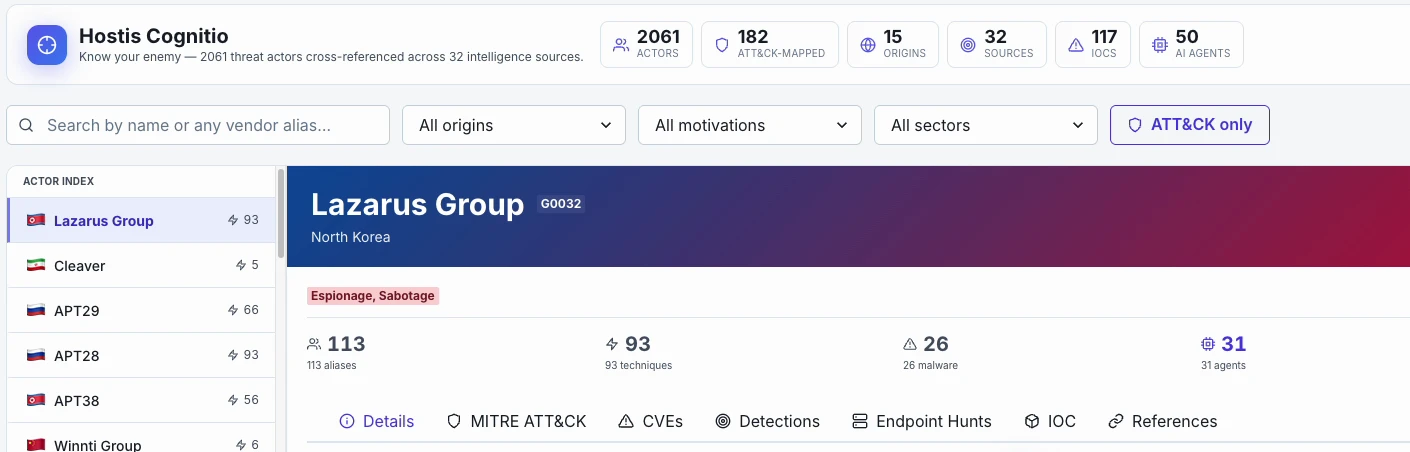
TRM attributes the theft, with high confidence, to TraderTraitor, a North Korean hacking unit. Security vendors track the same group under other names, such as Jade Sleet, UNC4899 and Slow Pisces, so reports about it are easy to miss.
Type "TraderTraitor" into Cognitio and it opens the Lazarus Group profile (MITRE ATT&CK G0032). Search matches the vendor aliases recorded in the catalog, so the team lands on one profile whichever report they started from. The MITRE ATT&CK tab lists the group's known techniques, and the Detections tab shows which of your synced detection rules match them.
That turns a headline into a question you can answer today: would we notice this group's usual methods? A profile is a research reference. It doesn't mean the group is in your network.
Step 2: The laptop alert gets a decision in Virtus Triage
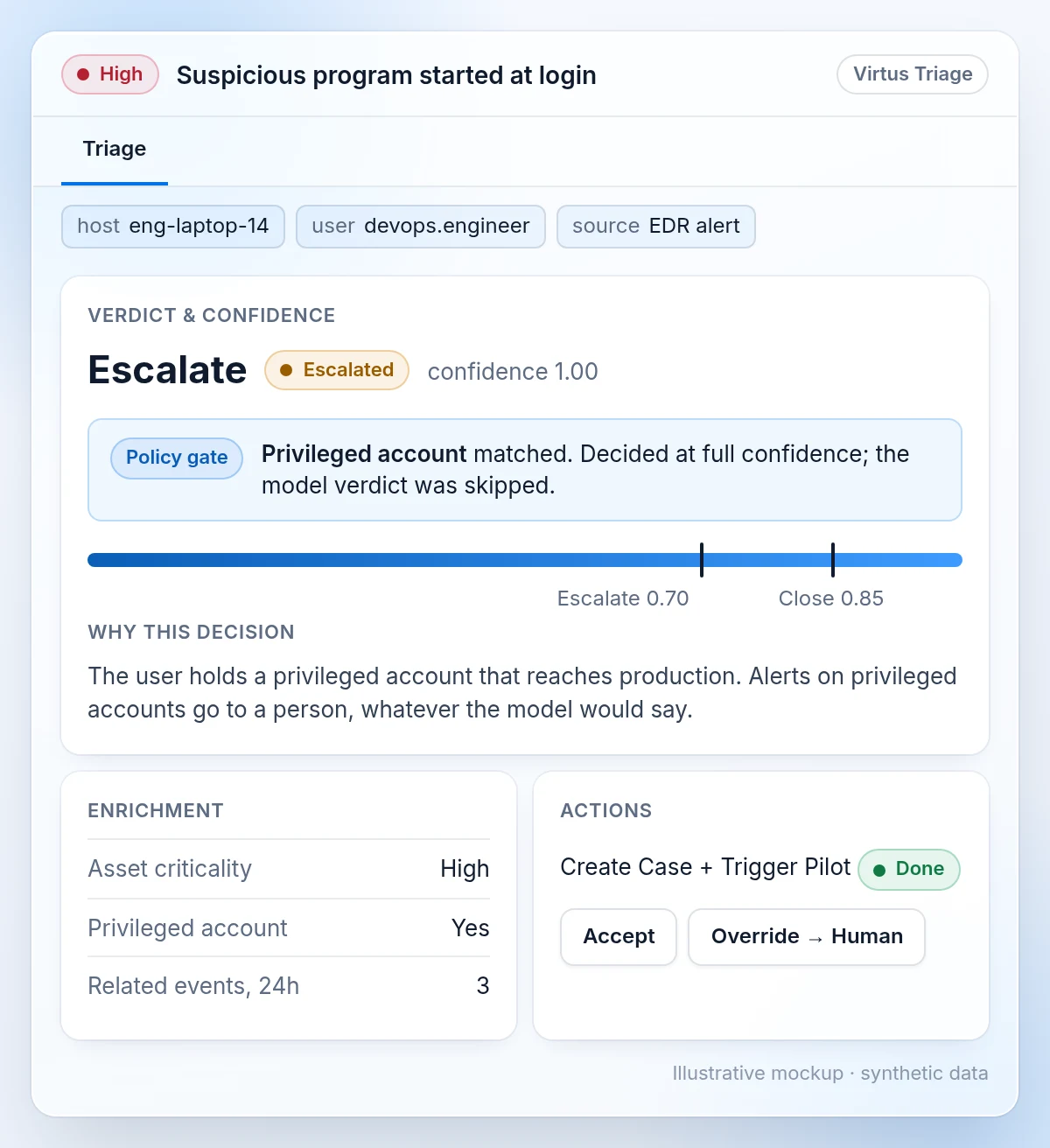
Say your endpoint tool flags an unknown program that starts when an engineer logs in. A Modus rule routes the alert to Virtus Triage.
Triage first adds context: how critical the device is, whether the account is privileged, and related events from the last 24 hours. Then your policy gates run. An engineer who can reach live systems usually has a privileged account, so the privileged-account gate matches. A gate match escalates the alert at full confidence and skips the model's verdict. Critical alerts, and alerts that mention ransomware, command-and-control or exfiltration, are never auto-closed.
By default, an escalation opens a case and starts a Virtus Pilot investigation. The report shows the verdict, the gate that matched and the evidence behind it. An analyst can override it, with a written reason.
Step 3: Virtus Pilot investigates the case
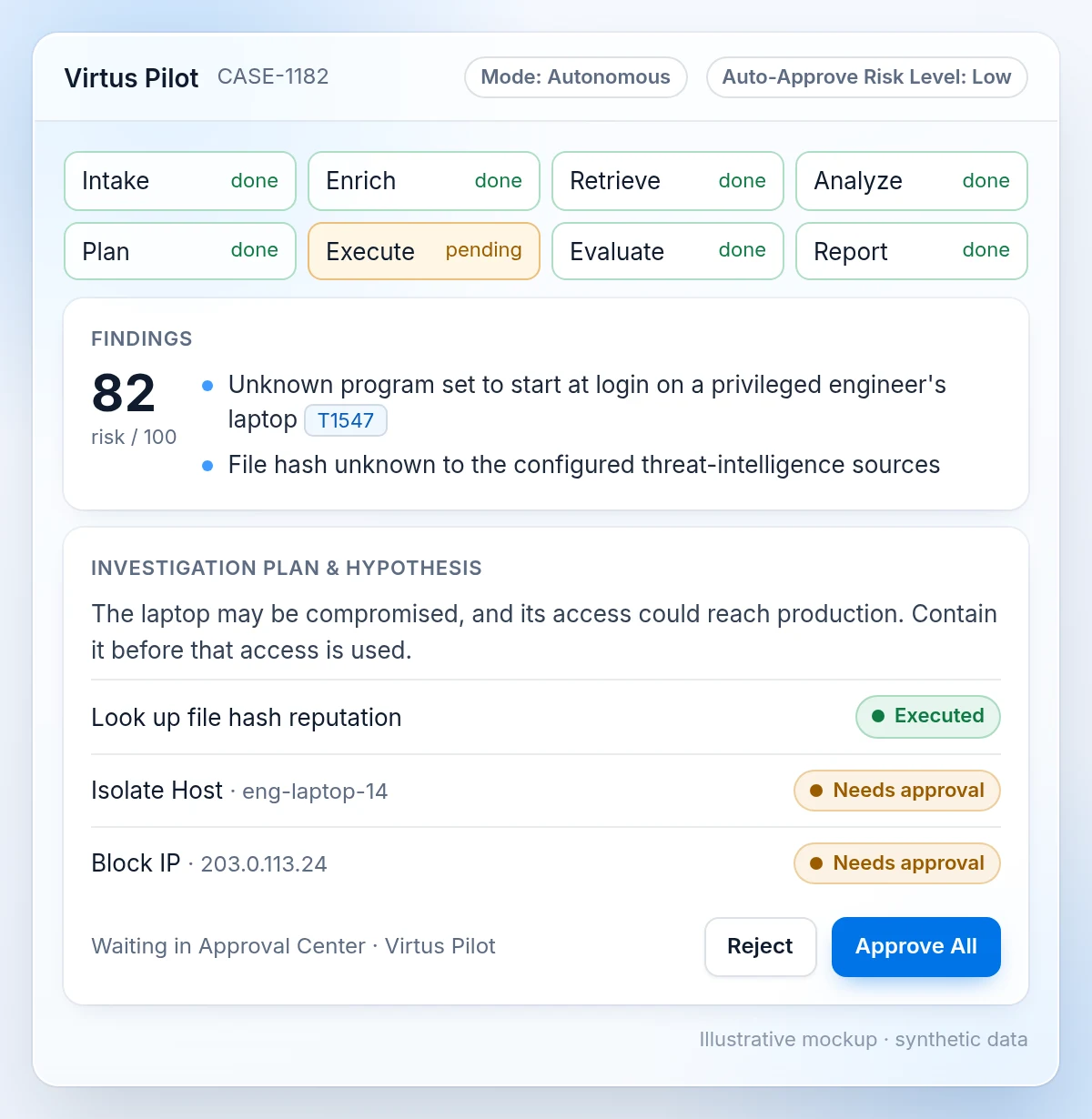
On its own, the laptop alert can look minor. The analyst needs to know what it might lead to. Virtus Pilot takes the case through eight phases: intake, enrich, retrieve, analyze, plan, execute, evaluate and report.
It looks up the program's file hash with your threat-intelligence sources, pulls in similar past cases and connections from Imperum's knowledge graph, and produces findings, a risk score, the ATT&CK techniques involved and an action plan.
By default, actions that change a host wait for a person: isolate, block, terminate, delete and quarantine always need approval. Those actions wait in the Approval Center beside the plan's hypothesis, and approving them runs them. Your team sets the risk level and the list.
Step 4: Cut off access with an approved playbook
Isolating an engineer's laptop can stop a deployment or a fix. The decision needs an owner, and the steps should be written down before the incident.
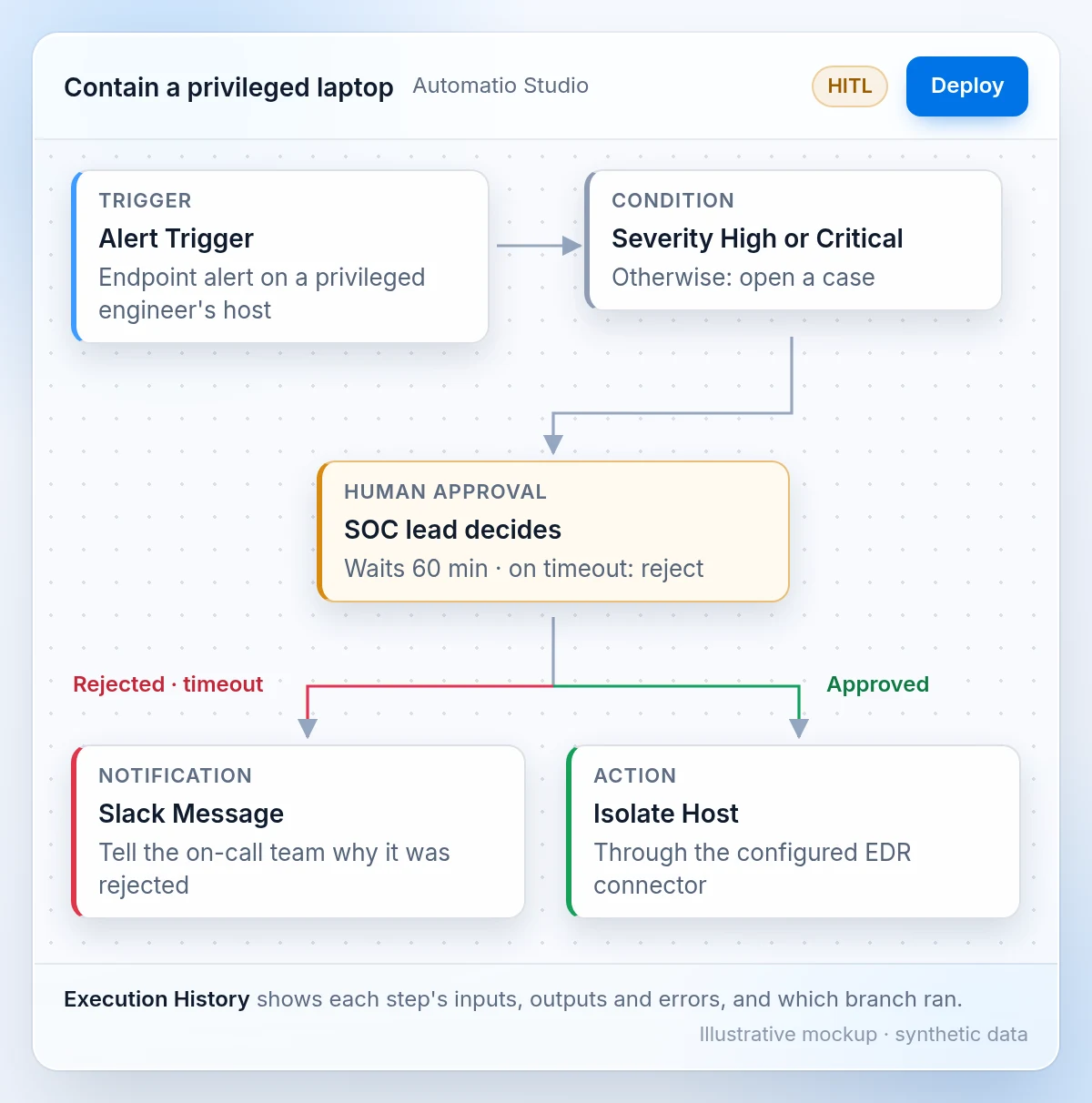
In Automatio, the team builds that response as a playbook. An Alert Trigger starts it, a condition checks the severity, and a Human Approval step waits for the person who owns the call. If they approve, Isolate Host runs through your configured EDR connector. If they reject it, or nobody answers within the wait time (60 minutes by default), the playbook takes the rejected branch and tells the team.
Execution History shows each step's inputs, outputs and errors, and which branch ran. So you can see whether the laptop was actually isolated, not just that the playbook finished. That's incident response automation: the repeatable steps run on their own, and the risky decision stays with a person.
What to test this week
- Search the names in this story in your threat intelligence, and check which of the group's techniques your detection rules cover.
- List the systems your engineers' laptops and accounts can reach, and remove access they no longer need.
- Confirm your security team receives usable records from the laptop, the sign-in system and the sensitive service.
- Decide who can approve cutting off access, including at night. In an authorized exercise, check that the action actually works.
See how these steps fit together for security operations teams.
Questions about the Binance hack
Do we know how the laptop was compromised?
No. The preliminary findings cited here don't identify the entry method, how long the attacker had internal access, or what alerts the security team saw. Naming a phishing message, software flaw or missed warning would go beyond the available evidence.
Does this show that Ethereum's security was broken?
No. EIP-7702 is a feature that lets a wallet hand its behavior to a program, and its use here doesn't establish a flaw in Ethereum itself. The open question is how the attacker obtained the signed authority needed to use it, which points back to the systems that sign transactions.
Could Imperum have stopped this attack?
The public findings don't support that claim. We would need to know which warning signs existed and when action could have interrupted the attacker. What Imperum offers is the path shown above: a named adversary in Cognitio, a decision on the first alert, an investigation that gathers the evidence, and a response that waits for the right person.